
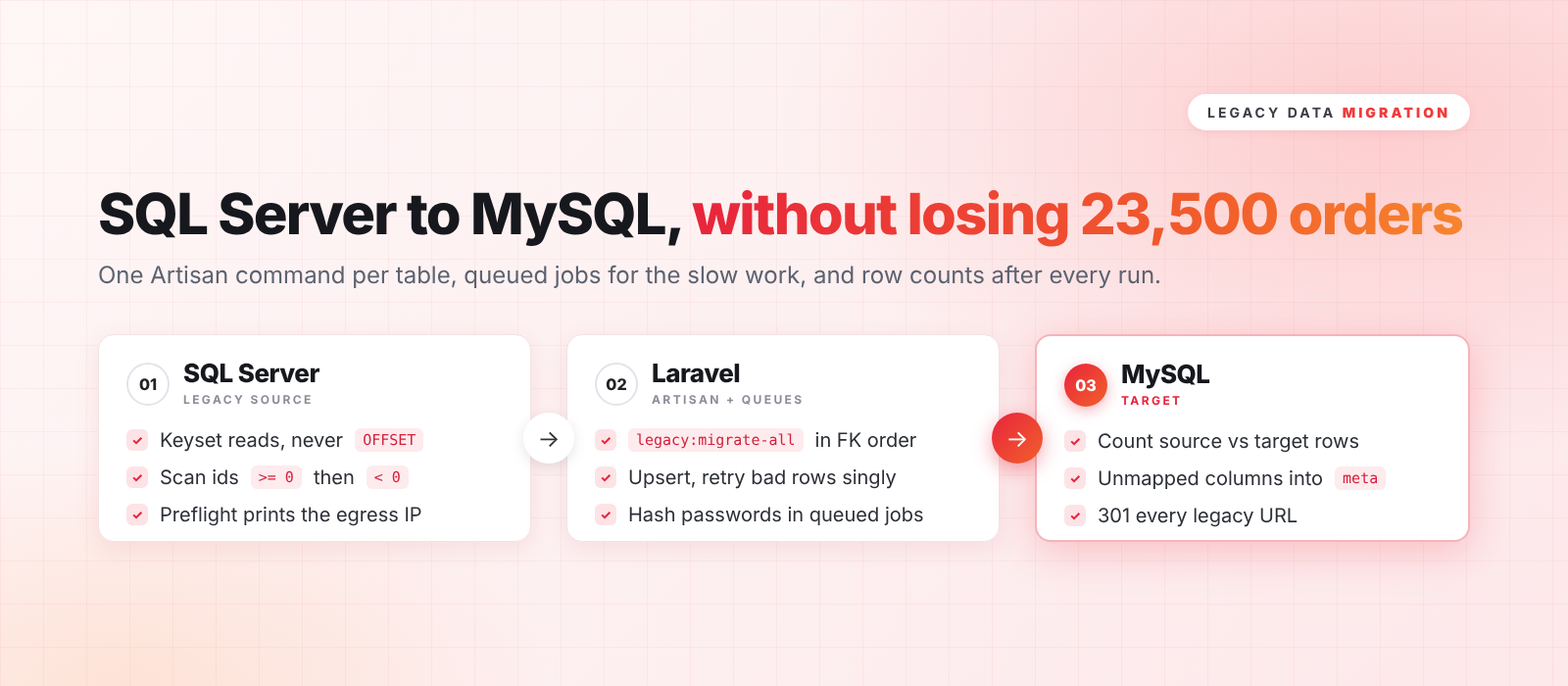
Our migration finished with zero errors. It had also skipped 23,500 orders.
Nothing crashed. No exception, no warning, no failed job. The orders were never read from the source. We found it by counting rows, which is the habit this whole post comes back to.
The project was a classic ASP and .NET e-commerce store, about 20 years old, running on Microsoft SQL Server at an old compatibility level. We moved it to Laravel with PHP 8.4, Lunar for the commerce core, Filament for the admin, and MySQL on AWS. The data included about 300,000 closed orders, tens of thousands of open carts, more than 100,000 customer accounts, subscriptions, promos, inventory logs, and loyalty points.
The business side of a migration like this is a separate topic. What to rebuild, what to rent, and how to plan cutover are covered in our guide to building or migrating a Laravel e-commerce store. This post is about the engineering: how we wrote the migration itself.
We wrote it as Laravel Artisan commands and queued jobs, inside the app, instead of a separate Python ETL script. I’d make the same call again, and I’ll explain why near the end, including where Python would have been better.
Start From the Legacy ASP and .NET Code, Not Just the Schema
A schema tells you a column’s type. It doesn’t tell you what the column means. For that, you need the code that reads it.
Our ground rule was simple. The legacy ASP source was the source of truth for business meaning. When a column was unclear, we read the real legacy SQL and ASP pages instead of guessing.
Here’s a real one. The legacy carts table had a column called CartAdminID. The name suggests the admin who placed the order. But the legacy bonus dashboard read the same column into a variable literally named repID. It was also the sales rep credited for the bonus. So we map it to both orders.assisted_by and orders.sales_rep_id. Reading the schema alone, we’d have lost the sales bonus data.
We started from a field-mapping spreadsheet that mapped every legacy table and column to the new schema. Each migrator’s docblock names the mapping it follows, like this:
Legacy accounts -> {customers, customer_addresses, addresses,
authorize_net_profiles, customer_customer_group, payment_methods, loyalty_points}
One rule saved us more than once: any legacy column with no home in the new schema goes into a meta JSON column. Nothing is dropped quietly. When someone asks for an old field six months later, it’s still there.
One Artisan Command Per Table, One Orchestrator
Every legacy entity has its own Artisan command: legacy:migrate-accounts, legacy:migrate-carts, legacy:migrate-subscriptions, and so on. There are about 38 of them, roughly 11,300 lines in total.
A single command, legacy:migrate-all, runs them in foreign-key order, parents before children. Customer groups and countries go first. Accounts come before addresses, products before variants, carts before cart entries. Password hashing runs last.
The orchestrator is short on purpose. This is the trimmed core of it:
foreach ($this->pipeline as $command) {
// Shared options (--chunk, --source, --target, --production),
    // filtered down to the ones this command declares.
    $exit = $this->call($command, $argsThisCommandAccepts);

    if ($exit !== self::SUCCESS) {
        $this->error("Aborting: {$command} failed (exit {$exit})");
        return $exit;
    }
}
It times each step. And if one step fails, it stops the whole pipeline, because a child table loaded on top of a broken parent only creates more cleanup.
The design choice that paid off most was this: every command can also run on its own. After go-live, almost every fix looked the same. Patch one migrator, re-run one command, often with --dry-run first. If you take one idea from this post, take this one.
Keep legacy IDs where you can
Many tables keep the legacy primary key as the new primary key. customers.id is the legacy AccountID. orders.id is the legacy CartID. Foreign keys can then be copied straight across, with no lookup per row.
A legacy_id_mappings table records every mapping as entity_type, legacy_id, new_id, and the original row values as JSON. It’s unique on entity_type plus legacy_id. That table became the audit trail when IDs needed changing, which you’ll see below.
One shared trait does the heavy lifting
Every migrator uses one trait, MigratesLegacyTable, about 830 lines. It holds the parts you don’t want 38 copies of.
It reads the source with keyset pagination (WHERE id > :last ORDER BY id), never OFFSET. Old SQL Server compatibility levels don’t support OFFSET ... FETCH, and deep offsets get slow anyway. Pivot tables without a single ID get a composite-key version.
It has three write helpers: plain insert, insert-or-ignore, and upsert. Tables that need to be safe to re-run use the upsert helper on their unique keys. A plain insert would fail on the second run with a duplicate-key error (1062). Batches are small: we dropped the chunk size to 50 rows for every command, which kept the app server at about 250 MB.
When a batch fails, it doesn’t kill the run. Every helper wraps its write the same way. Here’s the insert path:
foreach (array_chunk($this->sortRowsForBulkWrite($rows, ['id']), $batchSize) as $batch) {
try {
        $this->retryOnDeadlock(fn () => $this->target()->table($table)->insert($batch));
    } catch (Throwable $e) {
        // Retry this batch row by row and log only the rows that fail.
        $this->insertRowsWithSkipLogging($table, $batch, $e);
    }
}
At the end, the operator sees a list like legacy migration skipped row (orders id=…): reason. That’s a list of orphans to look at, not a stack trace at 2 AM.
Two smaller details matter when migrators run in parallel. Rows are sorted by key before every write, so parallel writers take index locks in the same order. That cut down our deadlocks. The ones left are retried up to eight times with random backoff, on SQLSTATE 40001 or MySQL error 1213.
The legacy data also had duplicate keys inside the same table. MySQL accepts a repeated key in one multi-row upsert, but it applies the rows in order, so the later row quietly overwrites the earlier one. We didn’t want that decided by accident. So the trait de-duplicates each batch first, and we chose per table whether the first or the last row wins.
The Bug That Dropped 23,500 Orders Without an Error
This is the story from the opening.
The legacy CartID, SubID, and EntryID columns were signed 32-bit integers, and they held negative IDs as well as positive ones. SQL Server doesn’t create those by wrapping around. An INT IDENTITY column that reaches 2,147,483,647 stops with an “Arithmetic overflow error converting IDENTITY to data type int”. Negative IDs mean the column was reseeded into the negative range, or the application generated its own IDs. Either way, a long run of rows sat below zero.
A keyset cursor that moves upward with WHERE id > :last only works if it starts below the smallest ID. Ours didn’t. It walked through every positive ID, reached the end, and stopped. 23,500 closed orders sat below zero and were never read. The command reported success, because from its point of view it had finished.
The first fix had its own trap
The obvious fix is to start the cursor below the smallest possible 32-bit value: -2147483649. It worked on MySQL. On SQL Server it matched nothing at all.
Here’s what we saw. Laravel binds PHP integers as PDO::PARAM_INT. On pdo_sqlsrv 5.12, the value was bound as a 32-bit integer, so -2147483649 wrapped around to 2147483647. Our query became WHERE CartID > 2147483647, which no row can match. pdo_mysql binds 64-bit integers, which is why the same code worked there.
The final version has no magic starting value. It scans in two passes, positive IDs first and then negative ones, and the range of each pass does the work:
protected function chunkLegacyOverflowId($baseQuery, string $idColumn, int $chunkSize, Closure $callback): void
{
    $this->chunkLegacyIdRange($baseQuery, $idColumn, $chunkSize, $callback, 0, null);  // ids >= 0
    $this->chunkLegacyIdRange($baseQuery, $idColumn, $chunkSize, $callback, null, 0);  // ids < 0
}
There was one more bug inside the fix. Some migrators rewrite the ID on the rows they receive, for example $c->CartID = $resolvedId. The cursor read its next position from those same rows, so it jumped outside the pass’s range and ended the pass early. Now the cursor value is saved before the callback runs:
$nextId = (int) data_get($rows->last(), $idColumn);
$callback($rows);
$lastId = $nextId;
Storing the IDs: we changed our minds three times
Reading the negative rows was half the problem. The other half was where to put them.
First we made the target columns signed BIGINT. That broke foreign keys and clashed with Lunar’s conventions and the rest of the schema. We rolled it back.
Then we kept the columns unsigned and mapped each negative value to V + 2³². No collisions, but the IDs were huge.
The final answer is abs(V). In theory that’s lossy, because -100 and +100 would collide. So we checked that no such pair exists in the source:
SELECT COUNT(*) FROM t a JOIN t b ON b.pk = -a.pk WHERE a.pk < 0;It returned zero for every affected table. The docblock says to switch back to V + 2³² if that ever changes. The original signed value stays in legacy_id_mappings, and a unit test covers the conversion.
The lesson is bigger than negative IDs. A migration that completes successfully can still lose data. Count source rows and target rows for every entity, after every run.
Where Queued Jobs Beat Artisan Commands
Most of the migration runs as plain Artisan commands, because the tables have to load in order. But two kinds of work don’t fit that shape: work that is CPU-heavy, and work that calls an external API. Both can run in parallel. That’s where queued jobs come in.
Password hashing after the bulk load
The legacy store kept passwords in plain text. That made the import easy and the clean-up urgent. legacy:migrate-accounts copies the value across as it is, and hashing runs as the last stage of legacy:migrate-all, before the new store opened to customers. Running bcrypt during the import itself would have made the accounts step crawl, so it waits until the bulk load is done.
The legacy:hash-passwords command splits customers into ID ranges of 50 and dispatches one job per range:
$maxId = (int) DB::table('customers')->max('id');
for ($from = 1; $from <= $maxId; $from += $window) {
    HashLegacyCustomerPasswordsJob::dispatch($from, $from + $window - 1);
}
Then you start as many queue:work processes as you have CPU cores, and throughput grows with them. There’s also a --sync option that runs the same code inline when no workers are available.
A few choices made it safe to run more than once. The job skips any value that’s already a bcrypt hash (one starting with $2y$, $2a$, or $2b$), so re-running the command is how you resume. That’s also why each job has $tries = 1.
It hashes at bcrypt cost 10, not the app’s usual 12. Each step of bcrypt cost doubles the work, so cost 10 is about four times faster, which matters for a one-time job. Since Laravel 11, the framework rehashes a password during login when the configured cost has changed (Laravel 11 upgrade guide). So each customer moves up to cost 12 on their first successful login.
And it runs a plain UPDATE on the password column, never an upsert. An upsert generates an INSERT that leaves out the other NOT NULL columns. MySQL strict mode rejects that with error 1364 before the update part ever runs.
If your legacy passwords are already hashed
Ours weren’t, but most .NET stores are. ASP.NET Membership usually stores a salted SHA1 or SHA256 hash, with the salt in its own column. ASP.NET Core Identity stores a PBKDF2 hash with the salt and iteration count packed into one Base64 string.
Don’t run the hashing job above on those. Bcrypt of a hash isn’t bcrypt of the password, and every login would fail.
You can’t turn a hash back into a password, so the conversion has to happen at login. Copy the old hash into a separate column such as legacy_password_hash, and leave password empty. Then extend Laravel’s EloquentUserProvider:
use Illuminate\Auth\EloquentUserProvider;
use Illuminate\Contracts\Auth\Authenticatable;
use Illuminate\Support\Facades\Hash;

class LegacyAwareUserProvider extends EloquentUserProvider
{
    public function validateCredentials(Authenticatable $user, array $credentials): bool
    {
        if (! $user->legacy_password_hash) {
            return parent::validateCredentials($user, $credentials);
        }

        // Rebuild the hash the way .NET did (hash_pbkdf2() or hash()) and compare.
        if (! LegacyDotNetHash::verify($credentials['password'], $user->legacy_password_hash)) {
            // The legacy hash may be stale, for example after a password reset.
            return parent::validateCredentials($user, $credentials);
        }

        $user->forceFill([
            'password' => Hash::make($credentials['password']),
            'legacy_password_hash' => null,
        ])->save();

        return true;
    }
}
Register it in a service provider’s boot() method:
Auth::provider('legacy', fn ($app, array $config) =>
new LegacyAwareUserProvider($app['hash'], $config['model']));
Then point your user provider at it in config/auth.php:
'providers' => [
'users' => [

        'driver' => 'legacy',

        'model' => App\Models\Customer::class, // your authenticatable model

    ],

],
One more piece. A password reset writes a new password but knows nothing about legacy_password_hash. If the old hash stays, it’s dead weight at best. So clear it on the model whenever a password is set:
protected static function booted(): void
{
    static::saving(function (self $customer) {
        if ($customer->isDirty('password') && $customer->password) {
            $customer->legacy_password_hash = null;
        }
    });
}
The fallback in the provider covers any path that skips the model, like a raw SQL update.
After the first successful login, the customer is on bcrypt and normal Laravel auth takes over. Customers who never log in keep the old hash forever. Pick a cut-off date and send everyone left after it through a password reset.
If the old hashes are weak, like single-round SHA1, there’s a stricter option. Bcrypt the old hash during the import, then check bcrypt(oldHash(typed password)) at login. That way the weak hash is gone from the database on day one, not on each customer’s next login.
Re-syncing a third-party service
The migration copied each customer’s loyalty flag and balance, but the external loyalty platform also needed a profile for every customer. Without one, the first profile edit on the new store would fail. So a follow-up command queues every customer through a sync job that creates the profile if it’s missing, then updates it.
Same pattern: bulk data first, slow external calls afterwards, spread across workers.
Getting PHP to Talk to an Old SQL Server
Budget real time for this part. It’s the first thing that breaks and the least interesting thing to fix.
Microsoft’s ODBC Driver 18 encrypts connections by default. Its docs say the Encrypt default “is yes in version 18.0 and later versions, and no in earlier versions” (Microsoft ODBC connection keywords). Our legacy server only offered TLS 1.0-era ciphers, and OpenSSL 3 rejects those. On top of that, the prebuilt sqlsrv packages we found were amd64-only, so they wouldn’t install on Apple Silicon Macs.
The fix had a few parts. Our Docker image installs msodbcsql18 and compiles the sqlsrv and pdo_sqlsrv 5.12.0 extensions from source. We patch the system openssl.cnf with a separate legacy section. Setting OPENSSL_CONF alone didn’t work, because sail artisan runs as a different user. A matching install script does the same on the EC2 servers, which run the setup from our Laravel on AWS production architecture. And encrypt and trust_server_certificate are configurable per environment in config/database.php.
The legacy database also only accepted allowlisted IP addresses, and some environments needed an SSH hop through a bastion. An SshTunnelService wraps the whole pipeline in a tunnel and cleans up after itself.
A preflight command saves a day of guessing
Before anything runs, legacy:preflight checks the environment. It prints the PHP version, the server’s public egress IP, and the connection settings with the password masked (it shows only “set (N chars)”). It confirms the sqlsrv extensions are loaded. Then it connects for real and prints the server version and the row count of the accounts table.
The egress IP turned out to be the most useful line. When a connection fails, the first question is always “which IP do we allowlist?” Now the command answers it.
Rehearse With Scrubbed Emails and a Frozen Copy
We rehearsed the full migration on staging before cutover. Two rules made those rehearsals safe and useful.
First, every rehearsal scrubs emails. Each customer address is rewritten onto the example.invalid domain, with the legacy ID added after a + so the unique index still holds. The .invalid top-level domain is reserved by RFC 2606 and can never deliver mail. A staging import can’t email a real customer. Only the real cutover passes --production, which turns scrubbing off. Make production the flag you have to type, not the default.
Second, check results against a frozen copy of the legacy database. The live legacy store kept taking orders after our snapshot. Comparing against it produced false mismatches. A frozen mirror gave us a fixed reference for every report and every count.
Dirty Data: Use Placeholders, Not Skips
Twenty years of production data is never clean. A few real cases, and what we did about them.
Duplicate staff emails: we kept the first, set the rest to NULL, and printed a count. Subscriptions with no default payment profile: we recovered the payment method from the subscription’s own profile ID, so renewals still had a card to charge. Saved cards: we migrated only the payment gateway’s profile IDs, never card numbers, because charging needs nothing else.
The case I’d warn you about is skipping. Order lines imported from online marketplaces had NULL or unknown item IDs. Our first run skipped them. The orders migrated fine, but “Quantity Sold” and line-level reports came out low. The fix was to keep those lines and point them at a purchasable_id = 0 placeholder. A one-time backfill command repaired the runs that had already happened.
A skipped row is a number that’s wrong forever. A placeholder row is a number you can explain.
Two more that bit us after go-live. A date-only ship date stored at midnight moved one day earlier when converted to the display time zone. Treat date-only values as dates, not timestamps. And a NULL payment type on subscriptions turned out to be a real value, on hundreds of rows. Code that assumed it was never NULL crashed an admin page in production.
What Only Showed Up After Go-Live
Some problems aren’t data bugs. They’re behavior changes, and they only appear when real customers use the new system.
Old carts came back. We migrated tens of thousands of open legacy carts. On login, customers saw items they’d left in a cart years ago. The fix was a soft-delete cleanup of idle carts. Soft, not hard, because orders.cart_id is the only link between a cart and its order.
Shipping on subscriptions changed. The legacy system copied a fixed shipping amount into each subscription. The new store quotes shipping live. A few hundred subscriptions got a different shipping cost. That’s a product decision, not a data fix, and it needs someone on the business side to own it.
Admin reports didn’t match at first. Legacy accounts with Closed = 1 became Laravel soft-deletes, and reports that ignored soft-deleted rows came out low. We checked every report against the frozen legacy copy, using the real legacy SQL as the reference.
Old URLs needed a home too. Every legacy product, category, tag, and blog URL returns a 301 to its new page, with a feature test per type. Blog URLs that can’t be resolved return a 404 instead of redirecting to the blog index. Redirecting everything to one page looks like a soft 404 to search engines.
Why Not a Python ETL Script?
The usual advice for a migration like this is a Python script with pandas or SQLAlchemy. It’s good advice for many projects. PHP isn’t built for bulk ETL. We managed memory by hand, with 50-row chunks, unset() after each batch, and the query log turned off. Python with server-side cursors could stream bigger batches with less effort.
For a one-off, mostly one-to-one table copy, I’d agree. A Python script, AWS DMS, or SQL Server’s bcp plus MySQL’s LOAD DATA would be faster to write.
Our project wasn’t that. It had heavy business mapping and a long tail of re-runs after go-live. That’s why we stayed in Laravel.
The migration knew the target schema. It ran inside the app, so it used the real Lunar currencies, channels, and morph types. It also failed fast, with messages like “No USD currency in lunar_currencies. Seed before running.”
One query builder spoke to both databases. Laravel’s query builder talks to SQL Server and MySQL with the same API. For local rehearsals, --source pointed at a MySQL copy of the legacy data instead.
Password hashes matched the app exactly. Hash::make() in a queued job produced hashes the app’s own login verifies and later rehashes. A separate Python bcrypt setup would have been one more thing to keep in sync.
Parallelism and deployment were already there. Queues gave us fan-out without Celery or new infrastructure. The commands shipped with the app, read the same config, and ran through the same remote Artisan script. No second runtime or secrets path on the servers.
The same team could fix it later. The migration helpers have PHPUnit tests next to the rest of the app. The redirects have feature tests. Backfill commands were still being written months after go-live, by the same PHP developers who built the store.
One honest note on the missing orders. A hand-written Python loop could have had exactly the same bug. The lesson isn’t “Laravel bad” or “Python good”. Test your pagination against the real ID distribution, including negatives, gaps, and overflow.
The Short Version
For a migration with real business logic in the mapping, write it inside the app. One re-runnable Artisan command per table, an orchestrator that runs them in foreign-key order, and queued jobs for the slow work after the bulk load.
One thing would change this advice. If your migration is a one-time, mostly one-to-one copy that nobody will re-run, use a database-native tool or a short script and move on.
Whatever you use, do one thing today. Pick your three biggest tables and compare the row count in the source with the row count in the target. If the numbers don’t match, find out why before go-live does it for you.
If your migration is already running and something doesn’t add up, send us one real problem from your backlog. We’ll fix it free, with no sales call.
FAQ
Can Laravel connect to Microsoft SQL Server?
Yes. Laravel supports SQL Server through the sqlsrv driver, which needs Microsoft’s sqlsrv and pdo_sqlsrv PHP extensions and an ODBC driver. With very old servers, expect extra TLS work, because ODBC Driver 18 encrypts by default and OpenSSL 3 rejects old ciphers.
Should I use Artisan commands or a Python script for a database migration?
For a one-time, mostly one-to-one copy, a script or a database-native tool is usually faster to write. Sometimes the mapping carries business logic, and you expect to re-run tables after go-live. Then Artisan commands inside the app are easier to test, deploy, and fix.
Why not use OFFSET pagination for large migrations?
Deep offsets get slower as the offset grows, and old SQL Server compatibility levels don’t support OFFSET ... FETCH at all. Keyset pagination (WHERE id > :last ORDER BY id) stays fast at any depth. Test it against your real ID range, including negative IDs.
How do you migrate passwords to Laravel?
It depends on what the old system stored. Ours kept plain text, so we bcrypt-hashed every value in queued jobs before go-live, at a lower cost for speed. Laravel 11 and later rehash to the configured cost on first login. If the old system stored hashes, as ASP.NET Membership and Identity do, keep them in a separate column and convert each one to bcrypt the next time the customer logs in.
How do you check that a data migration didn’t lose rows?
Compare source and target row counts for every entity after every run. Then compare business totals, such as order counts and revenue per month, against a frozen copy of the legacy database. A migration that reports success can still have skipped rows.
What happens to old URLs after a store migration?
Every legacy product, category, tag, and blog URL should return a 301 redirect to its new page, with a test for each URL type. URLs that can’t be resolved should return a 404, not a redirect to a generic page.
Tags

Larastaff
Related Articles
7 Filament Customizations Laravel Teams Need
Table of contentsHide 1. Custom Actions Aren't Authorized for You 2. Hidden Columns Aren't Protected…
Laravel + Redis: Where It Actually Helps in…
Table of contentsHide The Case for Adding Redis on Day One How to Tell Your…
Laravel 12 Breaking Changes to Fix After Upgrading
Table of contentsHide What You Don't Need to Change Find What Affects Your App in…
Leave a Comment