
In July 2025, Livewire shipped version 3.6.4 to fix a bug that let an unauthenticated visitor run code on the server. Every Livewire 3 release before it was affected, from 3.0.0-beta.1 through 3.6.3 (Synacktiv advisory). CISA added it to its Known Exploited Vulnerabilities catalog in March 2026, which indicates documented exploitation in the wild. None of that shows up in your code review, because the bug is in vendor/, not in anything your team wrote.
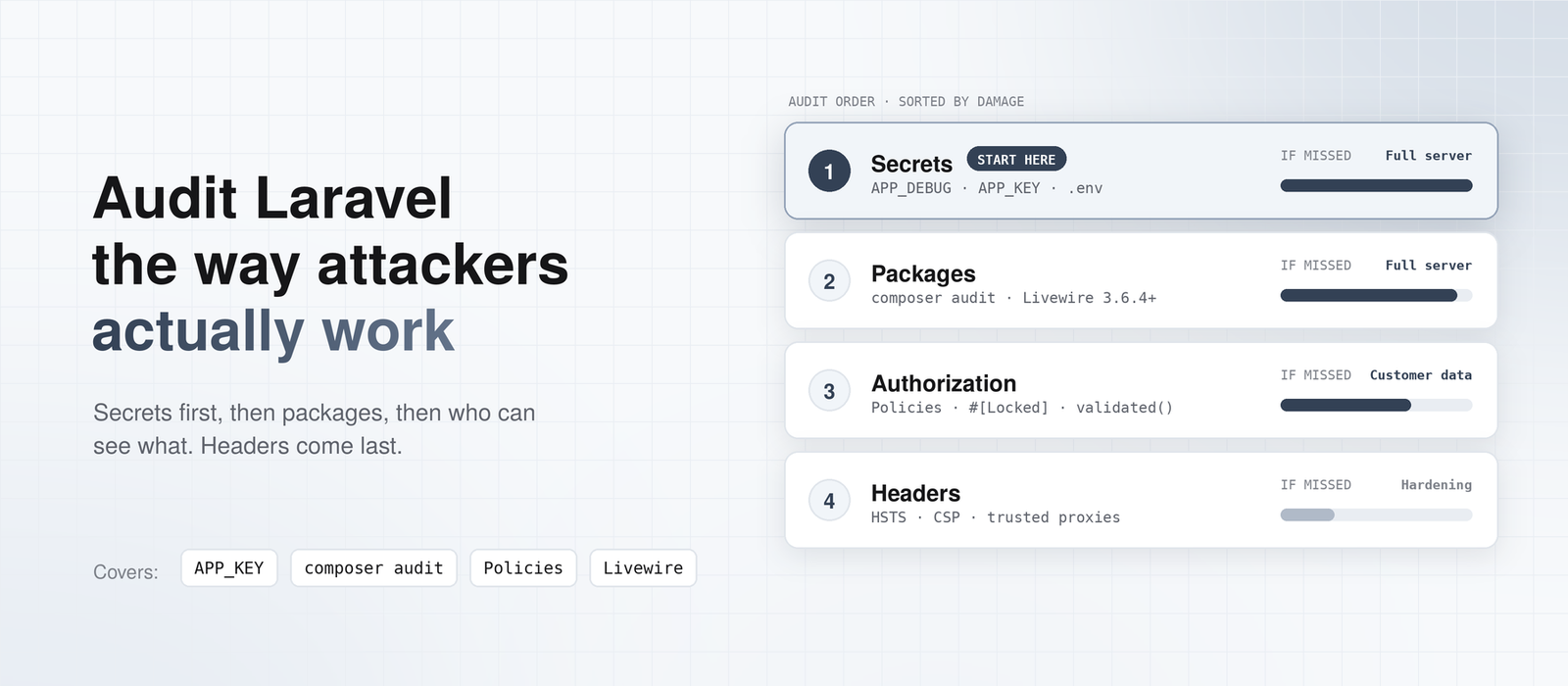
Most Laravel security checklists would not have caught it either. They give you fifty items of equal weight, and the first ten are usually about headers and file permissions. This guide takes a different position. Audit in the order an attacker would work. Secrets first, then what you are running, then who can see what. Headers come last.
Why a 50-Item Checklist Is the Wrong Place to Start
I get why long checklists exist. A compliance reviewer wants to see every box ticked. External scanners flag a missing Strict-Transport-Security header in red, so it feels urgent. And a long list looks thorough.
The problem is that the list treats a missing Referrer-Policy header the same as a leaked encryption key. One is a hardening gap. The other gives someone a shell on your server. When you have one afternoon, you need to know which is which.
So this post is ordered by damage. Each section starts with the check that finds the worst problem in that area. If you only get through the first three sections, you have still covered the problems that actually lead to breaches.
Start With the Key That Unlocks Everything: APP_KEY and .env
Your APP_KEY encrypts cookies and anything you pass through encrypt(), and it signs Laravel’s signed URLs. Anyone who has it can decrypt your encrypted data and forge signed links. That alone is a serious leak.
The worst case is code execution, and the details matter here. Laravel’s decrypt() and Crypt::decrypt() unserialize the decrypted value by default. decryptString() doesn’t. So the risk depends on whether your app decrypts data an attacker controls, using the default:
- Before Laravel 5.6.30, every encrypted cookie was serialized. A leaked key was enough for code execution on any app (CVE-2018-15133).
- Since 5.6.30, cookies are no longer serialized by default, so the general attack is closed.
- On current versions, it still works when the session lives in a cookie (
SESSION_DRIVER=cookie, as in CVE-2024-55556), or when your code or a package callsdecrypt()on user input (Synacktiv analysis).
Successful exploitation also depends on the PHP libraries your app has installed. Don’t treat that as a defense. The research below found hundreds of real apps where it worked.
So two quick checks belong here. Confirm SESSION_DRIVER isn’t cookie in production. Then find every decrypt() call and check where its input comes from:
grep -rn "decrypt(" app/ routes/
This is not a theory. GitGuardian and Synacktiv pulled more than 260,000 Laravel APP_KEY values from public GitHub repositories between 2018 and May 2025. Over 600 of the matching applications were exploitable (GitGuardian research).
Check debug mode first
The fastest way to leak your key is an error page. Laravel’s own docs warn that APP_DEBUG=true in production risks exposing sensitive configuration values to your users (Laravel configuration docs). Run this on the production server, not your laptop:
php artisan about --only=environment
You want to see production for the environment and OFF for debug mode. If debug is on, stop the audit and fix that first. Then treat the key as exposed, because you can’t know who triggered an error while it was on.
Check whether the key was ever committed
A .env that was removed from Git is still in Git history. Search every branch:
git log --all -p -S "APP_KEY=base64" -- .env '*.env*'
Any output means the key sat in a commit at some point. If the repository was ever public, or shared with a contractor who no longer works with you, assume the key is known.
While you’re here, compare production and staging. Staging is often built from a copy of the production .env, so both run with the same APP_KEY. Staging usually has weaker access control and debug mode on. A key leaked from staging then works against production. Give every environment its own key.
Also check how the web server is pointed. The document root must be public/, not the project root. If it points at the project root, https://yourapp.com/.env may serve your whole configuration as plain text.
Rotating a leaked key the right way
Laravel supports graceful key rotation through APP_PREVIOUS_KEYS, so users stay logged in while you move to a new key (encryption docs). That is the right tool for scheduled rotation.
It is the wrong tool for a leak. If you put the leaked key in APP_PREVIOUS_KEYS, Laravel keeps decrypting payloads signed with it, and that is the exact thing the attacker needs. For a leak, replace the key outright and accept that everyone gets logged out.
One warning before you do that. If you store encrypted database columns with the encrypted cast, re-encrypt that data with the new key first, or you will lose it. Password hashes are safe. They don’t use APP_KEY.
Check What You’re Running Before You Check What You Wrote
This check takes five minutes, and teams still skip it because it looks like upgrade work. It is security work. An unsupported framework version means the next vulnerability gets fixed for everyone except you.
Here is where support stands at the time of writing. Support dates move, so check the official pages before you act on them.
Laravel
| Version | Status | Source |
| Laravel 13 | Current major, released March 17, 2026 | laravel.com |
| Laravel 12 | Security fixes only, until February 24, 2027 | laravel.com |
| Laravel 11 and older | No fixes of any kind | laravel.com |
PHP
| Version | Status | Source |
| PHP 8.3 and newer | Supported | php.net |
| PHP 8.2 | Security fixes only, ends December 31, 2026 | php.net |
| PHP 8.1 and older | End of life since December 31, 2025 | php.net |
If you are on Laravel 11 or older, that is your first finding. The fix is an upgrade, and our upgrade service exists for exactly this. If you are going from 10, the Laravel 10 to 12 upgrade guide covers the path.
Run composer audit, even on Composer 2.9
Framework version is only part of the story. The Livewire bug above lived in a package, and so do most of the vulnerabilities you will actually meet. Run this against your production lock file:
composer audit
There’s a catch, too. Composer 2.9 added automatic blocking of package versions with known advisories, and it is on by default (Composer 2.9 release notes). That sounds like it solves the problem. It doesn’t, for an app that is already deployed. The blocking happens when Composer resolves dependencies, during update or require. A plain composer install from an existing lock file installs whatever the lock file says, vulnerable or not.
So an app that nobody has run composer update on in a year can deploy a known-vulnerable package every single day. My rule is simple: composer audit runs in CI on every pull request, and a failure blocks the merge.
Check Livewire separately
If you run Livewire 3, check the exact version:
composer show livewire/livewire | grep versions
Anything below 3.6.4 is exposed to CVE-2025-54068. The bug lets an attacker run commands on the server with no login and no user interaction. It needs a component that is mounted and configured in a particular way, so not every Livewire 3 app is exploitable (Livewire advisory).
Don’t spend the afternoon working out whether yours is. Upgrade today. The fix is a minor version bump.
If you suspect you were exploited, regenerate APP_KEY as well. Synacktiv, who found the bug, recommends this because an attacker with server access could have read it (Synacktiv advisory). Then follow the leaked-key steps above.
Authorization: The Bug Scanners Don’t Find
Scanners are good at versions and headers. They are bad at the question that matters most for a business app: can user A see user B’s data? That bug is called an IDOR (insecure direct object reference), and it is almost always a missing line of code, not a missing package.
Here is the pattern I look for first:
public function show(Invoice $invoice)
{
    return view('invoices.show', compact('invoice'));
}
Route model binding finds the invoice by ID. It does not check who owns it. Any logged-in user can change /invoices/41 to /invoices/42 and read someone else’s invoice. Nothing errors. Nothing gets logged.
The fix is one line that calls a policy:
use Illuminate\Support\Facades\Gate;

public function show(Invoice $invoice)
{
    Gate::authorize('view', $invoice);
    return view('invoices.show', compact('invoice'));
}
To audit this, list every route that takes a model. Then check each controller for a policy call, a can middleware, or a query scoped to the current user:
php artisan route:list –except-vendor
Scoped queries are the other honest fix
Policies aren’t the only way. You can also load the record through the user, so another user’s invoice is never found at all:
public function show(Request $request, int $id)
{
   $invoice = $request->->user()->invoices()->findOrFail($id);
    return view('invoices.show', compact('invoice'));
}
A user asking for someone else’s invoice gets a 404, not a 403. That also hides whether invoice 42 exists. I use scoped queries for simple ownership and policies when the rule is more complex, like “managers can see their team’s invoices.” Either is fine. What isn’t fine is neither.
It is slow, manual work to check every route. I don’t know a shortcut that is honest, and that is why this section matters more than any header.
Livewire components have the same bug in a different place
Livewire public properties travel to the browser and back. A user can change them. If a component holds a record ID in a public property and uses it to load data, that ID is user input. Mark it as locked:
use Livewire\Attributes\Locked;

#[Locked]
public int $invoiceId;
Then authorize in the method that uses it anyway. Locking stops tampering. It doesn’t prove the user was allowed to see the record in the first place.
Mass assignment is authorization too
This line lets a user promote themselves to admin if the model has $guarded = [] and the form sends an is_admin field:
$user->update($request->all());
Use $request->validated() so only the fields you validated reach the model. Then find the risky spots:
grep -rn 'guarded = \[\]' app/Models
grep -rn 'request->all()' app/
grep -rnE 'forceFill|forceCreate|Model::unguard' app/
forceFill() and forceCreate() skip the fillable rules on purpose, and Model::unguard() turns them off for every model. Each one is fine with trusted data and dangerous with request data. Check where the input comes from.
Input That Becomes Code: Raw Blade, Raw SQL, and Uploads
Laravel’s defaults protect you here, as long as nobody turned them off. Blade’s {{ }} escapes output. Eloquent and the query builder bind parameters. The audit is about finding the places where someone stepped around those defaults on purpose, usually to fix a display bug on a deadline.
Start with unescaped Blade output and raw SQL:
grep -rn '{!!' resources/views
grep -rnE 'DB::raw|whereRaw|selectRaw|orderByRaw' app/
Each {!! !!} needs a reason. If the content came from a user, even through an admin panel, it is stored XSS waiting to happen. Each raw SQL call needs its values passed as bindings, never glued into the string.
File uploads get their own look. Since Laravel 12, the image validation rule rejects SVG files unless you pass allow_svg (Laravel 12 upgrade guide). An SVG can carry JavaScript, so this was a good change. Search for allow_svg and make sure every place that allows it also sanitizes the file. Also check that uploads land on a private disk and are served through a route that checks permission.
Login, Tokens, and Sessions
Laravel’s starter kits throttle login attempts. Custom login endpoints, password reset forms, and API token routes often don’t, because someone built them later without copying the throttle. Look for auth-related routes that have no throttle middleware.
API tokens deserve a separate check. By default, Sanctum personal access tokens never expire. They only stop working when revoked (Sanctum docs). If your mobile app or an integration issued tokens two years ago, those tokens still work today. Set expiration in config/sanctum.php, and schedule sanctum:prune-expired so old rows get cleaned up.
Finally, check SESSION_SECURE_COOKIE. The session config reads it from the environment, and if it’s unset, the cookie can travel over plain HTTP. On a production site served over HTTPS, set it to true.
The Tools You Installed to Debug Production
Telescope, Horizon, Pulse, and Debugbar are great tools. They also record requests, queries, jobs, and sometimes payloads. Telescope and Horizon ship with gates that block access outside the local environment until you add users to them. The risk is the shortcut someone took when they needed access in a hurry:
Gate::define('viewTelescope', fn ($user = null) => true);
Search for these gates and read them. Then confirm barryvdh/laravel-debugbar is only in require-dev, and that production installs run with --no-dev. Open /telescope, /horizon, and /pulse in a private browser window. You should get a 403 or a 404, not a dashboard.
Headers and Infrastructure: Real, but Last
I’m not saying skip this part. I’m saying do it after the sections above. Laravel doesn’t send a Content-Security-Policy or HSTS header by default, so if you want them, you add them in middleware or at the web server. HSTS is quick. A real CSP takes testing, because a strict policy will break inline scripts and third-party widgets you forgot you had.
If you run behind a load balancer, check the trusted proxy settings too. When they’re wrong, $request->isSecure() returns false on HTTPS traffic. Secure cookies, generated URLs, and HTTPS redirects all depend on it, so they quietly behave as if the site were on HTTP.
In Laravel 11 and later, this lives in bootstrap/app.php:
->withMiddleware(function (Middleware $middleware) {
$middleware->trustProxies(at: ['10.0.0.0/8']);

})
List your load balancer’s addresses. Only use '*' when the app can’t be reached except through the load balancer, because otherwise anyone can fake the headers.
What This Audit Deliberately Skips
This guide covers the Laravel app itself. It doesn’t cover server hardening (OS patches, SSH, firewalls), cloud permissions, WAF rules, writing a full Content-Security-Policy, or penetration testing. Those matter. They are separate jobs, usually for different people, and a list that tries to cover all of them is how you end up back at fifty items of equal weight.
The Short Laravel Security Audit You Can Run This Week
If you want the whole audit on one screen, here it is in priority order:
APP_DEBUGis off in production, confirmed withphp artisan aboutAPP_KEYnever appeared in Git history and isn’t shared with staging; rotate it if it was (and don’t list it inAPP_PREVIOUS_KEYS)- The web server’s document root is
public/ - Laravel 12 or 13, PHP 8.3 or newer
composer auditis clean and runs in CI- Livewire 3 is at 3.6.4 or newer
- Every route that accesses a model enforces authorization, through a policy, middleware, or a scoped query
- Livewire IDs are
#[Locked];no$request->all()into models - Every
{!! !!}and raw SQL call has a reason and uses bindings - Sanctum tokens expire; auth routes are throttled; session cookies are secure
- Telescope, Horizon, and Pulse gates are closed; Debugbar isn’t installed in production
- HSTS and a tested CSP
Where This Advice Changes
My position is that a security audit should follow the damage, not the length of the list. Secrets and unpatched packages give attackers the whole server. Missing authorization gives them your customers’ data. Headers matter, but they are rarely how an app gets breached.
This order will shift. When Laravel 12 security support ends on February 24, 2027, item 4 moves to Laravel 13 only. If a future release stops decrypt() from unserializing by default, the APP_KEY section gets less urgent. It is still worth keeping the key secret either way.
For today, run the first three checks on your production server. They take ten minutes and cover the worst of it. If you would rather have someone else look, we will fix one real problem from your backlog for free, with no sales call. Send us the security issue you’ve been putting off.
FAQ
How often should I run a Laravel security audit?
Run the automated parts on every pull request: composer audit and your tests. Do the manual review, especially authorization, at least once a year and after any major feature that adds new data types or user roles. Also run it after a framework upgrade, because defaults change between versions.
Is Laravel 12 still secure to run in production?
Yes, for now. Laravel 12 gets security fixes until February 24, 2027, but its bug-fix window closed on August 13, 2026 (Laravel support policy). Plan the move to Laravel 13 before the security window ends, not after.
What happens if my Laravel APP_KEY is leaked?
An attacker with your key can decrypt your encrypted data and forge signed URLs. If your app decrypts attacker-controlled data with the default decrypt(), for example with SESSION_DRIVER=cookie, it can also lead to code execution on your server. Replace the key immediately and don’t list the old one in APP_PREVIOUS_KEYS. Re-encrypt any encrypted cast columns first so you don’t lose that data (Laravel encryption docs).
Does Composer 2.9 protect me from vulnerable packages automatically?
Partly. Composer 2.9 blocks vulnerable package versions when it resolves dependencies during update or require (Composer 2.9 release notes). A composer install from an existing lock file still installs what the lock file lists. Run composer audit in CI to catch what is already locked.
Which Livewire versions are affected by CVE-2025-54068?
Livewire 3.0.0-beta.1 through 3.6.3 are affected, and 3.6.4 contains the fix (Synacktiv advisory). Livewire 2 is not affected by this specific bug. If you think you were exploited, regenerate APP_KEY as well as upgrading.
Can an automated scanner replace a manual Laravel security audit?
No. Scanners are good at versions, known CVEs, debug settings, and headers, and you should use one. They can’t tell whether user A is allowed to see invoice 42. That authorization review needs a person who understands the business rules.
Tags

Ankur Patel
Software Engineer
Related Articles
Filament Performance: Fix a Slow Admin Panel
Table of contentsHide 1. Check Your Versions First 2. Find the Cause Before You Change…
How to Upgrade Laravel 12 to 13: What…
Table of contentsHide Should You Upgrade to Laravel 13 Now? Move to PHP 8.3 First,…
Why I Still Choose Laravel in 2026, and…
Table of contentsHide What Laravel Saves You After Launch Queues and the "run twice" problem…
Leave a Comment