
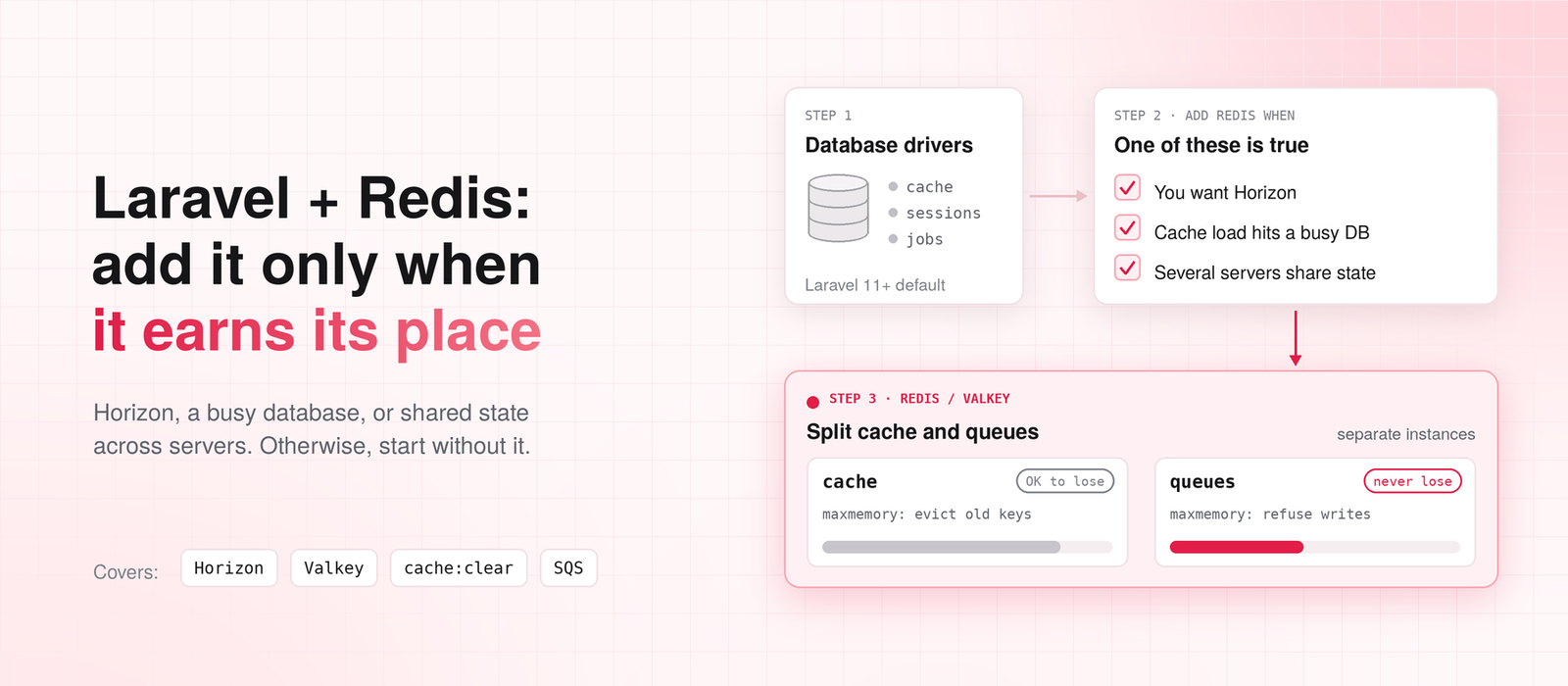
Since Laravel 11, a fresh app stores its cache, sessions, and queued jobs in the database. Redis is no longer the default for any of them (Laravel cache docs). Most teams still add Redis on day one anyway, out of habit, because every Laravel tutorial from the last ten years did.
My position is that you should start without it. Redis earns its place in a Laravel app for three reasons:
- You want Horizon, which only runs on Redis.
- Your cache is protecting a database that is actually busy.
- You run several servers that share fast-changing state, like rate limits and sessions.
If none of those is true yet, Redis is one more server to secure, monitor, and pay for, with nothing to show for it.
The Case for Adding Redis on Day One
I get the other side. Redis is fast, and everyone on the team already knows it. Switching drivers later means a deploy with some risk in it. Setting CACHE_STORE=redis on day one feels like cheap insurance.
For a team that already runs Redis for other apps, that argument is fair. The server exists, someone watches it, and one more app on it costs little.
For everyone else, the insurance isn’t cheap. You now have a second stateful service in production. It needs a password, network rules, memory alerts, and a plan for when it restarts.
And the database driver you replaced was fine. At low and medium traffic, a cache read from an indexed table is fast. No user will feel the difference. So I’d rather wait for a signal. Laravel’s drivers are swappable, which is exactly why you can afford to.
How to Tell Your Database Is Carrying Too Much
Start by checking what you’re actually running:
php artisan about --only=drivers
It prints the cache, queue, and session drivers in use. You’ll often find an app that “uses Redis” for only one of the three. Or one that still runs the file cache on three load-balanced servers. Each server then has its own cache, and they disagree with each other.
What the signal looks like
If you’re on the database drivers, watch four tables: cache, cache_locks, sessions, and jobs. They take a write on almost every request. Sessions update when the request ends. Rate limiters write a counter on every hit. Queue workers keep polling the jobs table, even when it’s empty.
On MySQL, this query shows how much read and write traffic those tables get compared to the rest of your schema:
SELECT object_name, count_read, count_write
FROM performance_schema.table_io_waits_summary_by_table
WHERE object_schema = 'your_database'
ORDER BY count_write DESC
LIMIT 10;
On PostgreSQL, pg_stat_user_tables gives you the same picture through n_tup_ins and n_tup_upd.
The signal is simple. Say cache, sessions, or jobs sit at the top of the write list, above your orders or invoices. Then they are competing with your real business queries. That’s the moment to move them. Not before.
Where Redis Earns Its Place
Horizon is the most common real reason
Horizon only works with Redis queues (Horizon docs). If you want its dashboard, its per-queue worker balancing, and its failed-job view, the decision is made for you.
I think Horizon alone justifies Redis once you have more than a handful of job types. Seeing which queue is backing up, and which job is failing, saves real hours when something breaks at night. The plain database queue works, but you’re guessing when it goes wrong.
A cache that protects a busy database
Caching is where most teams start with Redis. It’s also where they use it for the wrong thing. A cache should protect the database from repeated expensive reads: a dashboard total, a product listing, a permissions lookup that runs on every request.
It shouldn’t hide a slow query that needs an index. If a query takes four seconds, caching it means one unlucky user still waits four seconds every time the cache expires. Fix the query first. Our guide on preventing Laravel performance issues before production shows how to find those queries.
When the cache really is protecting the database, Cache::flexible() is the method I reach for. It serves the stale value while one request refreshes it in the background. So an expiring key doesn’t send a wave of requests to the database at once:
use Illuminate\Support\Facades\Cache;

// Fresh for 5 minutes. Stale but served for up to 15.
// After 15 minutes, the next request rebuilds it.
$stats = Cache::flexible('dashboard:stats', [300, 900], function () {
    return Order::query()
        ->selectRaw('count(*) as orders, sum(total) as revenue')
        ->whereDate('created_at', today())
        ->first();
});
The first number is how long the value counts as fresh. The second is how long it can still be served while a refresh runs (cache docs).
Cache tags are another practical reason. They don’t work with the file or database drivers. If your invalidation strategy depends on Cache::tags(), you need Redis or Memcached.
Shared state across several servers
Once you run more than one app server, rate limits, atomic locks, and sessions have to live somewhere shared. The database driver handles all three correctly. The question is volume.
A rate limiter on a busy public API writes to the database on every single request. At that point, moving the cache store to Redis takes a steady stream of small writes off your primary database. That is exactly the job Redis is good at.
There’s a good middle step here, too. Move only the cache store to Redis and leave sessions on the database. Laravel’s rate limiter uses your default cache store, so the rate-limit writes move with the cache. Often that alone takes enough load off the database.
Where Redis Doesn’t Help
A single-server app gains very little. Sessions and cache in a local database or file store are already fast, and you have no shared state to coordinate.
Redis is also the wrong home for anything you can’t afford to lose. Persistence exists, but it has limits. With AOF set to sync every second, which is the common setting, a crash can lose the last second of writes. With RDB snapshots, you lose everything since the last snapshot. Replication to a replica is asynchronous, so a failover can drop recent writes too (Redis persistence docs). That’s fine for a cache. It isn’t fine for your billing records.
Never put anything you can’t afford to lose in Redis, even with AOF turned on. Payments, orders, and account state belong in your database.
Choosing Where Your Queues Live
Queues deserve their own decision, because the choice isn’t only “database or Redis.” If you run on AWS and don’t need Horizon, SQS is worth a serious look. There’s no server to manage and nothing to fill up at 3 a.m.
This is how I compare the three:
| Database queue | Redis + Horizon | Amazon SQS | |
| Extra infrastructure | None | A Redis server | None (managed by AWS) |
| Dashboard | No | Yes, Horizon | CloudWatch metrics only |
| Can lose jobs if memory fills | No | Yes, if eviction is on | No |
| Works with Redis Cluster | Not applicable | Queues yes, Horizon no | Not applicable |
| Best fit | Low job volume, one database | Many job types, need visibility | AWS apps that want no queue server |
Sources: Laravel queue docs, Horizon docs, Laravel 13.5.0 release
Production Mistakes That Hurt More Than Skipping Redis
These three cause more trouble than not having Redis at all. Each one is a configuration choice, not a bug in Redis or Laravel.
cache:clear deletes your queued jobs
Laravel’s docs are clear on this: flushing the cache ignores the cache prefix and removes every entry in the store (cache docs). On Redis, that means everything in the Redis database the cache connection points to.
A fresh Laravel app protects you from this. Look at config/database.php:
'redis' => [
    'client' => env('REDIS_CLIENT', 'phpredis'),
    'default' => [
        'host' => env('REDIS_HOST', '127.0.0.1'),
        'port' => env('REDIS_PORT', '6379'),
        'database' => env('REDIS_DB', '0'),
    ],
    'cache' => [
        'host' => env('REDIS_HOST', '127.0.0.1'),
        'port' => env('REDIS_PORT', '6379'),
        'database' => env('REDIS_CACHE_DB', '1'),
    ],
],
The cache uses the cache connection on database 1. Now look at the redis connection in config/queue.php:
'redis' => [
    'driver' => 'redis',
    'connection' => env('REDIS_QUEUE_CONNECTION', 'default'),
    'queue' => env('REDIS_QUEUE', 'default'),
    'retry_after' => 90,
],
Unless you set REDIS_QUEUE_CONNECTION, queues use the default connection on database 0. So in a fresh app, a cache flush empties database 1 and leaves your jobs alone.
The trouble starts when someone “simplifies” this to one connection, or sets REDIS_CACHE_DB=0 to match the other one. It also happens when you move to a Redis Cluster, which only supports database 0. Then a routine php artisan cache:clear in a deploy script wipes out pending jobs. If sessions live there too, every user gets logged out.
Nothing errors. The jobs are just gone.
My rule is simple: queues and cache never share a Redis database, and on anything important, they don’t share an instance.
One eviction policy can’t serve both cache and queues
When Redis runs out of memory, its maxmemory-policy decides what happens. For a cache, you want eviction. Old keys get dropped and the cache keeps working.
For a queue, eviction is data loss. A job that gets evicted never runs, and nothing tells you.
You can’t set one policy that’s right for both, because the policy applies to the whole instance. That’s the practical reason to split them. The cache instance evicts. The queue instance refuses writes and alerts you when it’s full.
Check what your managed service sets by default. It may not be what you assume.
Horizon doesn’t support Redis Cluster, even though queues now do
This one needs care, because the answer changed recently. Plain Redis queues used to fail on a cluster with this error:
CROSSSLOT Keys in request don’t hash to the same slot
Laravel 13.5.0 fixed that. On a cluster connection, the queue driver now wraps queue names in hash tags for you. So all of a queue’s keys land on the same slot (Laravel 13.5.0 release). On older versions, you add the hash tag yourself by naming the queue {default} (queue docs).
Either way, queue:work on a cluster is fine.
Horizon is a different story. Its docs still say it is not compatible with Redis Cluster (Horizon docs).
This catches teams on AWS, because ElastiCache Serverless runs in cluster mode behind a single endpoint. If you want Horizon on AWS, use a node-based ElastiCache cluster with cluster mode disabled.
The Redis Setup I’d Use
If you’ve decided you need Redis for both cache and queues, here is the pattern. Give queues their own connection in config/database.php, pointing at a separate instance:
'queue' => [
'host' => env('REDIS_QUEUE_HOST', env('REDIS_HOST', '127.0.0.1')),
    'port' => env('REDIS_QUEUE_PORT', '6379'),
    'password' => env('REDIS_QUEUE_PASSWORD'),
    'database' => env('REDIS_QUEUE_DB', '0'),
],
Then point the queue at it in .env:
REDIS_QUEUE_CONNECTION=queue
REDIS_QUEUE_HOST=your-queue-instance.example.internal
The redis connection in config/queue.php reads REDIS_QUEUE_CONNECTION, so no code change is needed. If you run Horizon, set ‘use’ => ‘queue’ in config/horizon.php. Horizon then keeps its own metrics, job history, and failed-job records on that connection, next to the jobs themselves. The cache instance keeps an evicting policy. The queue instance doesn’t evict.
What to alert on
Most Redis trouble shows up in four numbers. Watch memory use, because a full queue instance starts refusing jobs. Watch evictions, which should stay at zero on the queue instance. Watch connected clients, since a sudden jump usually means workers are reconnecting in a loop. And watch queue depth.
On ElastiCache, the first three are CloudWatch metrics. For queue depth, Laravel has a built-in check you can schedule:
php artisan queue:monitor redis:default,redis:emails --max=500
It fires a QueueBusy event when a queue passes the limit, and you can send that to Slack or email (queue docs). Horizon users also get long-wait notifications built in.
Local development
Locally, I keep the database or array drivers for cache and sessions. They need no extra service, and they behave the same way for almost every feature. The exception is Horizon. If production runs Horizon, run it locally too, on a local Redis. Otherwise its config gets tested for the first time in production.
On AWS, Pick Valkey
If you are creating a new cache on ElastiCache today, pick the Valkey engine. It’s the open-source fork of Redis and speaks the same protocol. Laravel’s redis drivers talk to it without code changes. AWS prices it 20% lower than Redis OSS on node-based clusters and 33% lower on Serverless (AWS announcement).
For an existing Redis OSS cluster, the switch is a planned maintenance task rather than a rewrite. I’d still test it on staging first, like any engine change.
A Quick Decision Guide
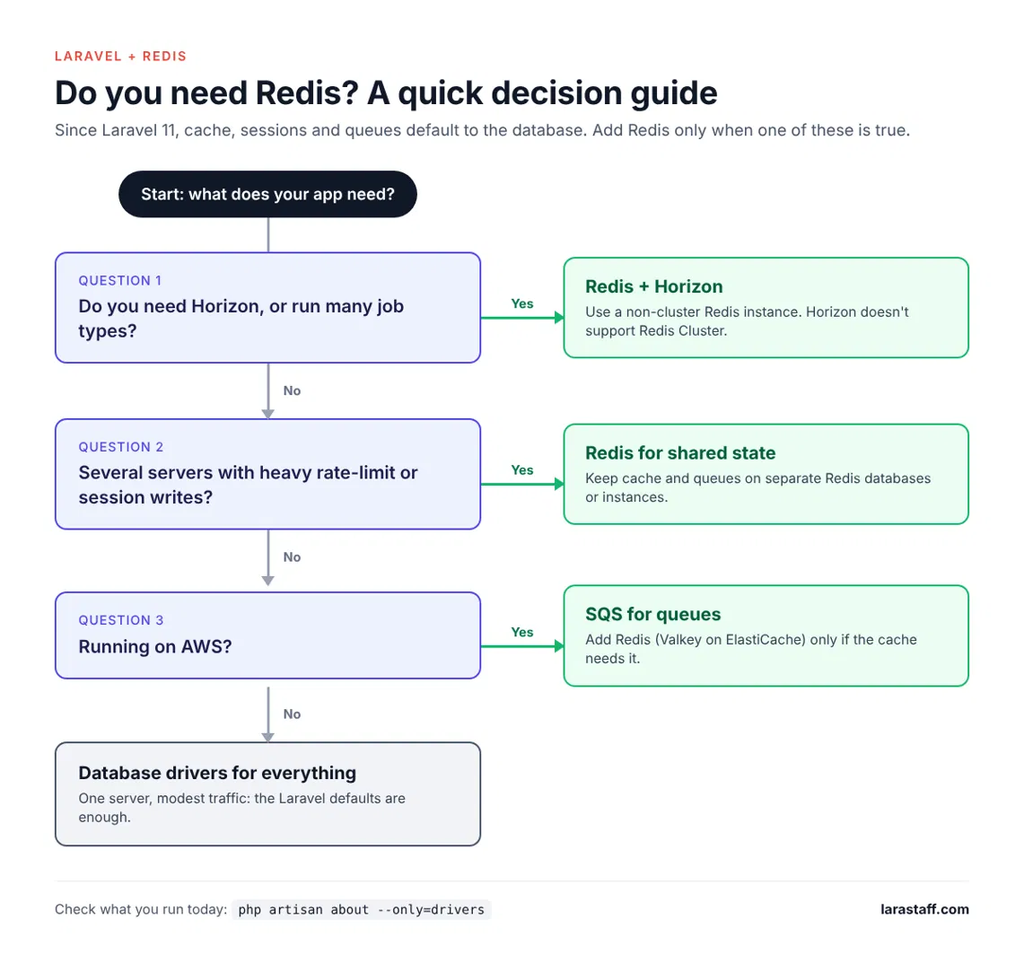
If you want the whole post as a few lines, this is how I’d decide:
- One server, modest traffic: database drivers for everything.
- Need Horizon or many job types: Redis with Horizon, on a non-cluster instance.
- Several servers, heavy rate-limit or session writes: Redis, with cache and queues split.
- On AWS, no need for Horizon: SQS for queues, Redis only if the cache needs it.
When I’d Change This Advice
My position stays the same. Start on the database drivers. Add Redis when Horizon, a busy database, or shared state across servers gives you a reason. When you add it, split cache and queues, and on AWS, use Valkey.
Two things would change this. If Horizon gains Redis Cluster support, the ElastiCache Serverless warning goes away. And if Laravel’s database queue gains the kind of visibility Horizon has, the strongest reason to run Redis gets weaker.
For today, run php artisan about --only=drivers on production. If Redis is in there, open config/database.php and confirm your cache and queue don’t share a database. That one check prevents the worst mistake in this post.
Want a second look? Paste your php artisan about --only=drivers output and the one queue or cache problem that bothers you most, and we’ll look at it. It’s part of our free first fix: one real problem fixed, no sales call.
FAQ
Does Laravel need Redis?
No. Since Laravel 11, new apps use the database for cache, sessions, and queues by default (Laravel cache docs). Redis becomes worth it when you want Horizon, when cache and session writes load a busy database, or when several servers need fast shared state.
Is Redis faster than the database cache driver in Laravel?
Yes, for raw reads, because Redis serves from memory. The bigger difference is load: every database cache read and write competes with your real queries. On a quiet database you won’t notice. On a busy one, moving the cache to Redis gives the database room to breathe.
Does Laravel Horizon work with Redis Cluster or SQS?
No, it works with neither. Horizon requires a Redis queue connection and, per its docs, is not compatible with Redis Cluster (Horizon docs). Plain Redis queues do work on a cluster, and Laravel 13.5.0 and later handle the hash tags for you.
Why did php artisan cache:clear delete my queued jobs?
Because your cache and queue share a Redis database. Flushing the cache ignores the cache prefix and clears the whole database the cache uses (cache docs). Keep them on separate Redis databases, or better, separate instances.
Should I use Valkey instead of Redis with Laravel?
Yes, on AWS, for new caches. Valkey is protocol-compatible with Redis, so Laravel’s redis driver works unchanged. ElastiCache prices it 20% lower on nodes and 33% lower on Serverless (AWS announcement).
Tags

Larastaff
Related Articles
Laravel on AWS: Production Architecture That Scales
Table of contentsHide What Breaks When You Add a Second Server Sessions and cache stuck…
Upgrade Laravel 10 to 12: What Breaks and…
Table of contentsHide Why Laravel Upgrades Matter The safest Laravel 10 to 12 upgrade path…

Laravel Performance: Catch Slow Code Early
Table of contentsHide Find Risky Code in Two Minutes Set Up These Guardrails First 1.…
[…] works, and it’s the default since Laravel 11. Redis helps once the database gets busy. Our Laravel + Redis post covers when that switch is worth […]