
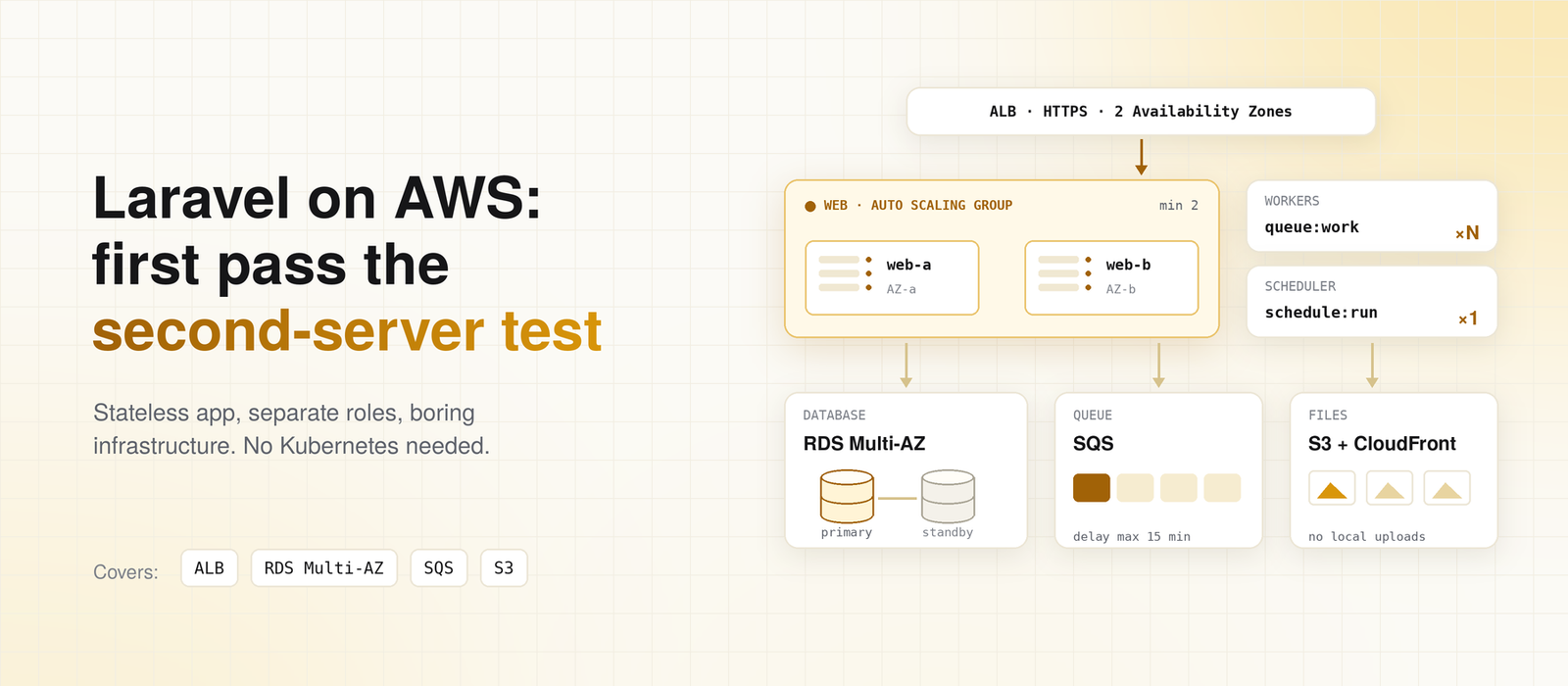
Most “Laravel on AWS” diagrams show fifteen services: containers, Aurora, a service mesh, three kinds of cache. Then the app goes live on one EC2 instance, with sessions in local files and uploads in storage/app. The diagram was never the problem.
Here’s the test I use instead. Could you add a second web server tomorrow without breaking anything? If the answer is no, adding AWS services won’t make the app scale.
My position is simple: a scalable Laravel app on AWS is a stateless app with boring infrastructure. Get the app ready for a second server first. Then the AWS part is mostly a load balancer and an Auto Scaling group.
What Breaks When You Add a Second Server
On one server, a lot of things work by accident. Files, sessions, and cron all live on the same disk, so nothing disagrees. The moment a load balancer sends requests to two servers, each one has its own copy of that state. These are the three that break first.
Sessions and cache stuck on one machine
If SESSION_DRIVER is file, a user logs in on server A. Their next request lands on server B, which has never heard of them. They get logged out at random, and the bug never shows up on your laptop.
The file cache has the same problem in a quieter form. Each server caches its own copy, so a value you cleared on one server is still served by the other. Move both to a shared store.
The database driver works, and it’s the default since Laravel 11. Redis helps once the database gets busy. Our Laravel + Redis post covers when that switch is worth it.
If you start on the database driver, keep an eye on the sessions and cache tables. They take writes on almost every request, and expired sessions are only cleaned up on a random sample of requests (the lottery setting in config/session.php). Watch their size and their place in your slow query log. When they start competing with real queries, that’s your signal to move.
Uploads saved to local disk
A file uploaded to server A only exists on server A. Half your users then get a 404 for it, depending on which server answers. The fix is S3, and Laravel’s s3 disk handles it with no code changes beyond config.
I’d also skip access keys entirely. If AWS_ACCESS_KEY_ID and AWS_SECRET_ACCESS_KEY are empty, Laravel leaves credentials to the AWS SDK, which picks up the EC2 instance role:
FILESYSTEM_DISK=s3
AWS_DEFAULT_REGION=us-east-1
AWS_BUCKET=your-app-uploads
# No access keys here. The instance role provides credentials.
That’s one less secret to leak. For private files, Storage::temporaryUrl() gives users a link that expires, so the bucket itself stays private.
The scheduler runs on every server
This one costs real money. Each server’s cron calls schedule:run, so every scheduled task runs once per server. With three web servers, your daily invoice reminder goes out three times. If the task charges a card, the customer sees three charges.
You have two fixes. The first is onOneServer(), which takes a lock so only one server runs the task:
// routes/console.php
use Illuminate\Support\Facades\Schedule;

Schedule::command('invoices:send-reminders')
    ->dailyAt('09:00')
    ->onOneServer();
The lock needs a cache store that every server shares, such as the database or Redis (scheduling docs). The second fix is to run the scheduler on exactly one machine, which is what I prefer. It can be a small, always-on instance, because schedule:run does very little work itself. Heavy tasks should dispatch jobs to the queue anyway.
The Architecture I’d Start With
Once the app is stateless, the AWS side is not complicated. An Application Load Balancer sits in front, spread across two Availability Zones. Behind it is an Auto Scaling group of web servers with a minimum of two, so one can fail without an outage.
The database is RDS with Multi-AZ turned on. Uploads go to S3, with CloudFront in front for public assets. Email goes through SES. Queues run on SQS or Redis, processed by worker servers that are separate from the web servers.
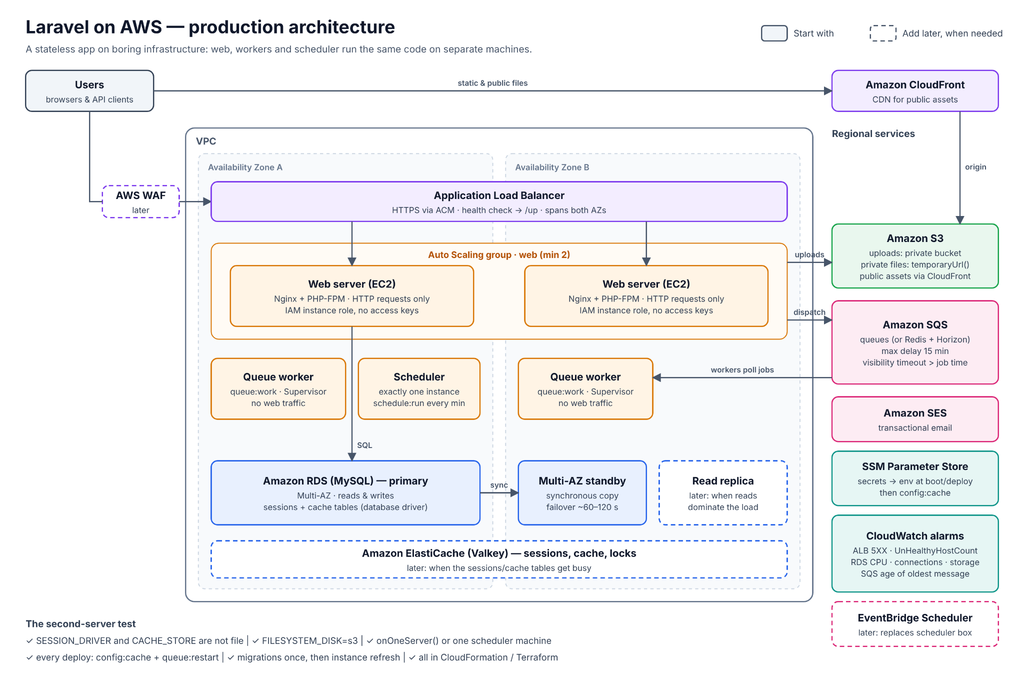
This is how I’d stage it:
| Layer | Start with | Add later, when |
| Traffic | ALB across 2 AZs, HTTPS via ACM | WAF, when you see real abuse |
| Web | Auto Scaling group, minimum 2 instances | Larger instances or more of them, from CPU metrics |
| Database | RDS Multi-AZ | Read replicas, when reads dominate the load |
| Cache and sessions | Database driver | ElastiCache (Valkey), when those tables get busy |
| Queues | SQS, or Redis with Horizon | Separate queues per job type |
| Files | S3, CloudFront for public assets | Signed CloudFront URLs for private media |
| Secrets | SSM Parameter Store | Secrets Manager, if you need automatic rotation |
Sources: Laravel deployment docs, RDS Multi-AZ docs
Whatever you choose, keep it in code, with CloudFormation or Terraform. A setup that only exists in someone’s console clicks can’t be rebuilt at 2 a.m.
What I Wouldn’t Add on Day One
If you take one idea from this post, take this one: don’t add complexity before the app needs it. I’d leave out Kubernetes, multi-region failover, and splitting the app into microservices. Each one solves a real problem. They are problems most Laravel apps don’t have yet, and each adds work your team pays for every week.
I get the case for containers. ECS on Fargate removes server patching, and if your team already knows Docker well, it’s a fair choice from the start.
Managed platforms like Laravel Cloud and Vapor go further and remove most of this post. That’s a valid trade if you’d rather pay the platform than run servers. What I’d avoid is picking the complex option because a diagram looked impressive.
Split Web, Workers, and Scheduler Into Separate Roles
The biggest architecture decision in this post isn’t an AWS service. It’s running the same code in three roles on different machines.
Web servers answer HTTP requests. Worker servers run queue:work under Supervisor and never take web traffic. One scheduler instance runs schedule:run every minute. Later, you can drop that instance and trigger schedule:run from EventBridge Scheduler instead, for example through SSM Run Command.
The code is identical. Only the process each machine starts is different.
Here’s why I split them. A worker that runs a heavy report or a big import can eat the CPU and memory on its machine. If that machine also serves web requests, your users feel it. Separate roles also scale on their own terms: web on request load, workers on queue depth.
There’s a catch, too. Queue workers are long-running processes, so they keep the old code in memory after a deploy. Every deploy needs to end with:
php artisan queue:restart
Otherwise, workers keep processing new jobs with the previous release’s code. Nothing in the deploy log will warn you.
The Database: Multi-AZ First, Read Replicas Later
Multi-AZ is the first thing I’d pay for. RDS keeps a standby copy in a second Availability Zone and fails over to it when the primary dies. AWS says failover typically completes in 60 to 120 seconds (RDS Multi-AZ docs). That’s a short outage instead of a long night.
Web requests recover by themselves, because each request opens a fresh connection. Workers are long-running, so jobs that were in progress during the failover can fail. Make sure your jobs have retries, and that a retried job can’t do the same thing twice.
Read replicas come later, and only when reads really dominate the load. Laravel supports them in config:
// config/database.php

'mysql' => [
    'read' => ['host' => [env('DB_READ_HOST')]],
    'write' => ['host' => [env('DB_HOST')]],
    'sticky' => true,
    // ...the rest of your connection settings
],
Keep sticky on. Replicas lag slightly behind the primary. Without sticky, a user saves a form and the next page reads from a replica that hasn’t caught up yet. They see their old data and assume the save failed.
Queues on AWS: The SQS Limits That Bite
SQS is a good default for queues on AWS. There’s no server to patch and nothing to run out of memory. It has three limits that catch Laravel teams, though.
Delays can’t exceed 15 minutes
SQS caps message delay at 15 minutes (SQS quotas). Laravel’s queue docs mention this too. So this works on Redis and fails on SQS:
SendTrialEndingEmail::dispatch($user)->delay(now()->addDays(3));
For anything further out, use the scheduler to find records that are due, then dispatch the job at that point.
Messages have a size limit
SQS raised its maximum message size from 256 KiB to 1 MiB on August 4, 2025 (AWS announcement). Check older queues, though. A queue created before then with an explicit maximum size can keep its old 256 KiB limit, so look at its MaximumMessageSize attribute.
The bigger limit is more room, but a job that serializes a large model or collection can still hit it. Pass IDs to jobs, not whole objects, and load the data inside handle().
Visibility timeout decides when a job runs twice
On SQS, Laravel doesn’t use the retry_after setting. Retries follow the queue’s visibility timeout, which you set in AWS (queue docs). If a job runs longer than that timeout, SQS assumes the worker died and hands the job to another worker. Now the job runs twice, at the same time.
Set the visibility timeout longer than your slowest job’s timeout. If a few jobs run long, give them their own queue with a longer timeout.
When Redis beats SQS anyway
If none of these limits bite, the main practical reason to pick Redis over SQS is Horizon. Its dashboard shows which queue is backing up and which job keeps failing. On SQS, you get CloudWatch numbers and have to work out the rest yourself. For an app with many job types, that visibility is worth running a Redis instance.
Health Checks, Deploys, and Monitoring
Point the load balancer at /up
Since Laravel 11, apps ship with a health route at /up. Point the ALB target group’s health check there. The route confirms the app boots. It also fires a DiagnosingHealth event, which you can hook into to check the database (deployment docs).
I’d keep that check light. If the database blips and every server fails its health check at once, the load balancer has nowhere to send traffic.
Keep secrets out of the server image
Don’t bake a .env file into your AMI. Store values in SSM Parameter Store, and write them to the environment when the instance boots or deploys. Then a new server can’t start with last month’s database password.
Rebuild the config cache on every deploy
php artisan config:cache reads your environment once and saves the result. After that, Laravel ignores .env changes until you cache again. So if you update a parameter in SSM but don’t rebuild the cache, the server keeps running the old value. Every deploy, and every config change, should end with config:cache on every instance.
Rolling deploys without downtime
With an Auto Scaling group, I’d deploy by replacing servers, not by updating them in place. Build a new launch template version with the new release, then start an instance refresh. AWS swaps instances a few at a time and keeps a minimum share healthy (instance refresh docs).
The ALB stops sending new requests to an old server before it goes away. It waits for in-flight requests to finish, for up to the target group’s deregistration delay (ALB target group docs). Users don’t notice.
Two things need care. Run migrations once, from one machine, before the refresh starts. And for a while, old and new code run side by side, so a migration must not break the old release. Add a column first and remove the old one in a later deploy.
php artisan down is not a zero-downtime tool. It puts the whole app in maintenance mode. Keep it for the rare change that really can’t run alongside old code.
The alarms worth setting first
You don’t need a big dashboard on day one. A handful of CloudWatch alarms catches most real trouble:
- ALB:
HTTPCode_Target_5XX_CountandUnHealthyHostCount - RDS:
CPUUtilization,DatabaseConnections, andFreeStorageSpace - SQS:
ApproximateAgeOfOldestMessage, which tells you jobs are waiting too long
I prefer the age of the oldest message over the queue length. A long queue that drains fast is fine. An old message means workers are stuck or too few.
When I’d Change This Advice
My position stays the same: make the app stateless, split the roles, and keep the AWS side boring. Two web servers, Multi-AZ RDS, S3, and a queue will carry most Laravel apps much further than people expect.
I’d change it if your team already runs containers well, because ECS becomes the simpler path. I’d also change it if a managed Laravel platform fits your budget and compliance needs. Then running servers yourself is work you don’t need.
For today, run the second-server test on your app. Check these four settings:
SESSION_DRIVERandCACHE_STOREaren’t fileFILESYSTEM_DISKiss3for anything users upload- Scheduled tasks use
onOneServer(), or only one machine runs the scheduler - Your deploy runs
config:cacheand queue:restart on every instance
If any of those fail, fix them before you add a single AWS service. If you’d like a second opinion on your setup, we’ll fix one real problem from your backlog for free, with no sales call.
FAQ
What is the best AWS architecture for a Laravel application?
For most apps: an Application Load Balancer across two Availability Zones and at least two web servers in an Auto Scaling group. Add RDS with Multi-AZ, S3 for files, and SQS or Redis for queues. Run queue workers and the scheduler on separate machines from the web servers.
Can Laravel run on multiple servers behind a load balancer?
Yes, once the app is stateless. Sessions and cache need a shared store, uploads need S3, and scheduled tasks need onOneServer() or a single scheduler machine (scheduling docs). Without those changes, users get logged out and tasks run twice.
Should I use SQS or Redis for Laravel queues on AWS?
Use SQS if you want no queue server to manage. Use Redis if you want Horizon’s dashboard or need job delays longer than 15 minutes, which SQS doesn’t allow (SQS quotas).
Do I need Kubernetes to scale Laravel on AWS?
No. An Auto Scaling group of EC2 instances behind a load balancer scales most Laravel apps. ECS on Fargate is a good choice if your team already works with containers. Kubernetes adds operational work that few Laravel apps need.
Why do my Laravel scheduled tasks run more than once on AWS?
Because every server runs schedule:run. Add onOneServer() to each task, which needs a shared cache store, or run the scheduler on only one machine.
Tags

Parth Khunt
Tech Lead
Related Articles
How to Monitor Laravel on AWS with CloudWatch
Table of contentsHide CPU Is the Wrong First Alarm Three Places Problems Show Up The…
Why I Still Choose Laravel in 2026, and…
Table of contentsHide What Laravel Saves You After Launch Queues and the "run twice" problem…
Laravel 12 Breaking Changes to Fix After Upgrading
Table of contentsHide What You Don't Need to Change Find What Affects Your App in…
Leave a Comment