
Why Laravel Upgrades Matter
Laravel upgrades usually become painful for two simple reasons: they take time, and they are easy to put off. You can go on and on leaving your Laravel upgrades forever, but the further behind you get, the more CVEs can come out.
A lot of times, these upgrades specifically protect against critical vulnerabilities fixed in newer releases. We have to keep on top of releases because attackers are constantly exploiting those older vulnerabilities once they’re discovered. Practically, I think patching against CVEs is the most important reason to stay current. People know what is vulnerable in those older versions, so you need to keep on top of it.
Aside from that, there are a lot of quality-of-life improvements in each release, and developers are actively watching this. Developers love being able to use the latest and greatest when it comes to quality of life. I constantly have developers on my team sending me messages: “Hey, look at this new upgrade. Look at the latest thing they released in PHP version XYZ.”
There are lots of reasons you might want to upgrade. The truth is that the manual process we have here, an AI-assisted version of the same process, and something like Laravel Shift have made it easier and more practical than ever to stay on top of these changes.
But easier does not mean risk-free. I’ve gone through multiple Laravel upgrades, and almost every time there is a breaking change. This guide walks through what actually breaks when you move from Laravel 10 to Laravel 12 and how to keep those changes small, isolated, and testable.
The safest Laravel 10 to 12 upgrade path
The overall process is to take a defensive approach toward your application. From a business standpoint, you don’t want your application to go down. You don’t want there to be a critical customer-facing error because you did a migration. Your business is important, and you need it to run properly.
Yes, we want to do these upgrades to prevent CVEs and for various other reasons, including developer experience. But at the same time, you don’t want to do this haphazardly and have it create an outage—whether it’s a visible outage or an invisible outage hiding in the background.
It can be like a monster hiding there that jumps out and gets you when you’re getting ready to go for a long Memorial Day weekend and your team has time off. That is what we’re trying to prevent: the hidden issue that doesn’t show itself during the deployment but becomes a critical business problem later.
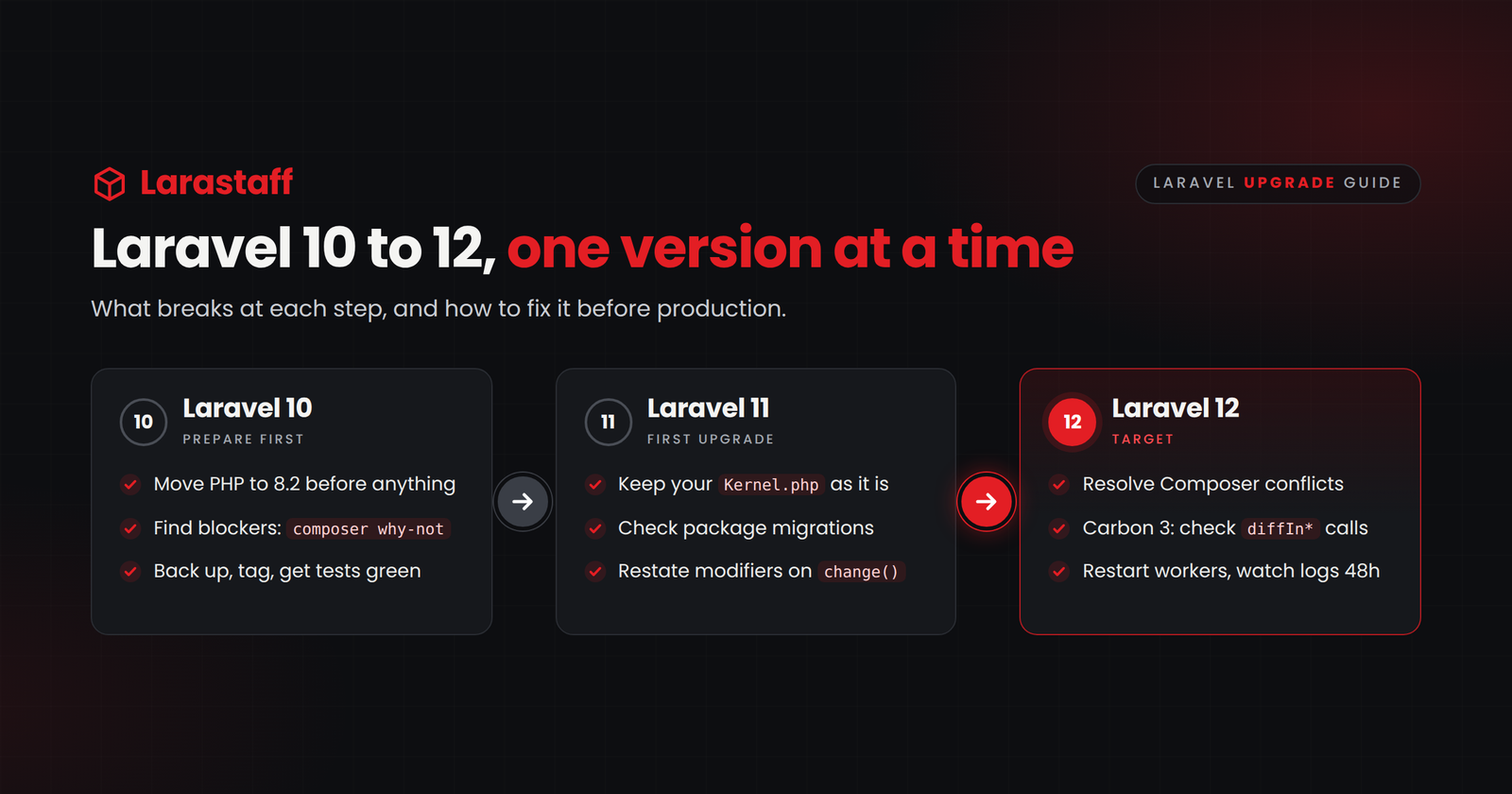
The standard advice is always to go up one version at a time:
- Laravel 10 → Laravel 11
- Laravel 11 → Laravel 12
Part of this is for testability, but the main thing is that at each step, we can see exactly which changes are required from the previous version. If you go straight from 10 to 12, you may miss the upgrades that you need to make from 10 to 11 before moving from 11 to 12.
It is practical advice: every time you do this, use a step-up method. You kind of graduate. Do your 10-to-11 upgrade first. These are major upgrades, so you don’t want to miss anything there before you go from 11 to 12.
Then do actual QA testing on your entire site and make sure nothing broke between 10 and 11 before jumping to 12. If something did break, you know what you are looking at. It makes it much easier for you or your developer to solve it. If a developer goes directly from 10 to 12, they may be looking for an issue introduced during the 10-to-11 upgrade without knowing it.
By making the smallest possible change, you improve the overall testability of the system. If the change is breaking, you know it is related to that change and not to something else happening at the same time.
Should You Go to Laravel 13 Instead?
Laravel 13 is now available, so it is a fair question. But the answer doesn’t really change the process in this guide. The official Laravel 13 upgrade guide estimates about ten minutes for the framework-level changes from 12 to 13, but that estimate does not include your application’s package conflicts, custom code, or QA.
You still need to account for the changes between Laravel 10 and 11, and then between Laravel 11 and 12. Once the application is stable on Laravel 12, you can decide whether to continue to 13 as another isolated step.
The main thing to check is PHP. Laravel’s support table lists Laravel 12 with PHP 8.2 through 8.5 and Laravel 13 with PHP 8.3 through 8.5. If your servers already run PHP 8.3 or later and all of your packages support Laravel 13, you can continue after Laravel 12 is stable. If they don’t, stop at 12 and plan the PHP and Laravel 13 upgrades separately.
With the upgrade path clear, the migration breaks into three stages: prepare the application, move from Laravel 10 to 11 and stabilize it, and then move from Laravel 11 to 12 and stabilize it again.
Before you start the Laravel 10 to 12 upgrade
Establish a clean baseline
Make sure everything is in a clean state. Start from the latest version of the application’s main branch—or whatever primary branch the application uses—and make sure everything is correctly backed up in case there are issues on the production side.
Locally, run the test suite and make sure you have the current passing results, so you know where you are before starting. Work on a fresh branch with no other changes aside from the Laravel upgrade.
A practical starting checklist is:
- Pull the latest version of the application’s primary branch.
- Commit or remove unrelated pending changes.
- Take a production database backup and confirm that it can be restored.
- Run the existing test suite and record the passing baseline.
- Create a fresh branch that contains only the upgrade work.
- Write down the important queue jobs and scheduled commands that need to be checked after deployment.
If you don’t have a complete test suite, focus first on the things that cost money or create serious operational problems when they break: login, checkout, payments, primary API endpoints, billing cycles, due dates, and reports.
Jumping into an upgrade too fast without a good testing framework is a major risk. The question should be: How are we going to make sure that every change we make doesn’t break anything?
Upgrade PHP separately when you can
Any time you do a Laravel upgrade, you have to check whether a PHP upgrade is also required. If your server, Docker container, or wherever your application code lives is running the wrong PHP version, the Laravel upgrade obviously won’t work. PHP is a dependency.
Starting locally, upgrade the PHP version first if it is required. In addition to everything you have to check for the Laravel change, you need to make sure that your PHP changes didn’t break anything.
Sometimes it makes sense to separate this into two deployments. You say, “We’re going to upgrade PHP. We’re going to rebuild all of our Docker images, and we’re going to PHP 8.2 first.” Even a one-version PHP upgrade can expose compatibility problems, so do a QA pass, make sure everything is working correctly, run your tests, and deploy it first.
Then you can go back and say, “Okay, now we’re going to do our Laravel upgrade,” and go through that whole process again. If you tried to deploy a Laravel upgrade without fixing PHP first, everything would break.
Keep the PHP version aligned across your local environment, CI pipeline, Docker images, staging, and production. Otherwise, your passing tests may not represent the application you actually deploy.
Find Composer blockers before the upgrade
Before updating the framework, check the direct dependencies and ask Composer what prevents the target version from being installed:
composer outdated --direct
composer why-not laravel/framework 11.0
composer why-not—an alias of composer prohibits—shows which packages prevent the target framework version from being installed. Those blockers may need to be updated, replaced, or removed before the upgrade can continue.
You want to make sure that the rest of your Composer packages are up to date. If an installed package does not support the newer Laravel version, Composer may require you to update it before continuing. There may also be something that creates a breaking change or a direct conflict. That is why you may need to replace or remove something that blocks the upgrade.
Don’t use --ignore-platform-reqs as though it fixes the problem. That flag tells Composer to ignore PHP, extension, and other platform requirements. It does not make your runtime compatible, and it does not resolve ordinary conflicts between package versions.
Step 1: Upgrade Laravel 10 to Laravel 11
Update your dependencies
For a typical application, the core changes in composer.json look like this:
"require": {
    "php": "^8.2",
    "laravel/framework": "^11.0",
    "laravel/sanctum": "^4.0"
},
"require-dev": {
    "nunomaduro/collision": "^8.1"
}
Then run:
composer update --with-all-dependenciesIf you use other official Laravel packages, they need to move to Laravel 11-compatible versions too. The official Laravel 11 upgrade guide specifies laravel/passport ^12.0, laravel/telescope ^5.0, laravel/cashier ^15.0, and livewire/livewire ^3.4, among other package updates. Only add constraints for packages the application actually uses, and read each package’s upgrade notes before changing it.
If Livewire is one of those dependencies, our guide to practical Filament, Livewire, and Vue.js fixes covers related application-level problems worth checking while you test.
PHP compatibility problems
If Composer refuses to install Laravel 11 and shows an error like this, one of your environments is still using the wrong PHP version:
laravel/framework[v11.0.0, ..., v11.x] require php ^8.2
-> your php version (8.1.27) does not satisfy that requirement.
Upgrade PHP on your local machine, CI pipeline, Docker images, staging environment, and production servers. Keep them on the same PHP version so the tests you run match the application you deploy.
Package migration changes
According to the Laravel 11 upgrade guide, Laravel 11 no longer automatically loads migrations for Cashier Stripe, Passport, Sanctum, Spark Stripe, and Telescope. If your application uses any of those packages, publish that package’s migrations as part of the upgrade:
php artisan vendor:publish --tag=cashier-migrations
php artisan vendor:publish --tag=passport-migrations
php artisan vendor:publish --tag=sanctum-migrations
php artisan vendor:publish --tag=spark-migrations
php artisan vendor:publish --tag=telescope-migrations
Run only the commands for packages the application uses. Before running migrate, review the published files alongside database/migrations, the production schema, and the production migrations table. Do not blindly apply a create-table migration to a table that already exists. The goal is to bring the migrations under application control without recreating production data structures.
Middleware and authentication issues
New Laravel applications may use a newer structure for middleware and configuration. That does not mean an existing application needs to be restructured during the framework upgrade.
This is usually self-inflicted. A developer sees that a new Laravel 11 project registers middleware in bootstrap/app.php, deletes the existing app/Http/Kernel.php, and then middleware, authentication guards, or route protection stops working.
The main thing is order of operations. If the main thing is to get the upgrade done, let’s get the upgrade done first.
I wouldn’t say to avoid restructuring and cleanup in general. It is much nicer to move off those older files because people who haven’t used older versions of Laravel may not know where things are. I would also suggest making that change. You just may not need to make it initially.
Keep the existing app/Http/Kernel.php, service providers, and configuration structure working through the Laravel upgrade. Laravel 11 supports the existing application structure. Once the application is stable, you can modernize it as a separate, testable task. That would be my philosophy.
Database columns losing their settings
Database column changes can be dangerous because they do not always produce an obvious error. A migration that changes one property can unintentionally remove another property, such as a default, unsigned setting, or comment.
In Laravel 11, when you use change(), you have to repeat every setting you want to keep. Anything you leave out can be removed. This is exactly the kind of invisible problem that may not show up as an exception during deployment.
For every migration using change(), repeat every attribute you intend to keep:
// Original column
$table->integer('credits')->unsigned()->default(0);

// This can remove "unsigned" and the default
$table->integer('credits')->nullable()->change();

// Repeat all attributes that must remain
$table->integer('credits')->unsigned()->default(0)->nullable()->change();
The important part is not merely getting the migration to run. It is confirming that the resulting production schema still means what the business expects it to mean. If you have many old change() migrations, you can also consider squashing them with php artisan schema:dump so they aren’t replayed against fresh databases in CI.
Test and stabilize Laravel 11
Now run the test suite and do actual QA testing on the entire site. Check authentication, payments, API endpoints, migrations, scheduled commands, and queue jobs.
Make sure nothing broke between Laravel 10 and 11 before jumping to Laravel 12. If something did break, you know what you are looking at. It gives you or your developer a much better chance of solving it because the issue belongs to this single change.
Step 2: Upgrade Laravel 11 to Laravel 12
Update your dependencies
Once Laravel 11 is stable and QA is complete, update the framework and testing dependencies for Laravel 12. The official Laravel 12 upgrade guide estimates about five minutes for the framework-level changes, but your application’s packages, custom code, and QA determine the real effort:
"laravel/framework": "^12.0",
"phpunit/phpunit": "^11.0"
If the application uses Pest, update it to ^3.0; otherwise update PHPUnit to ^11.0. Then run the Composer update again:
composer update --with-all-dependenciesAt this step, third-party packages, dates, tests, and application-specific behavior are often where the real work appears.
Composer dependency conflicts
If Composer cannot resolve the package set, ask it what blocks Laravel 12:
composer why-not laravel/framework 12.0Then work through the blockers in order:
- Update the package to a maintained version that supports Laravel 12, after reading its changelog.
- Replace it with a maintained alternative if it is no longer supported.
- Remove it if the feature can be disabled or the dependency is no longer needed.
Again, the goal is to make the smallest possible change and test it. If something breaks, you want to know which change caused it.
Carbon 3 and incorrect date calculations
We’ve had multiple applications where dates were incredibly important. We used Carbon extensively in both the application and its tests.
You can have many different issues come up with dates. If you aren’t doing business days properly, or you’re not using business days when you should be, or there is an inaccuracy around the number of days, that can create a critical outage for a client. It can also create a substantial amount of bad data that requires massive SQL rewrites to get an application back on track.
You never want to have issues related to Carbon or your dates. You want to get those correct so you don’t incur a system-wide outage.
Laravel 11 supports both Carbon 2 and Carbon 3, so Carbon-related failures can appear during the first upgrade depending on how Composer resolves your dependencies. Laravel 12 removes Carbon 2 support and requires Carbon 3. Carbon 3 uses stricter numeric types in places and changes the diffIn* methods to return signed floating-point values where older code may have expected an absolute integer.
Configuration values originating in .env may be strings even when a Carbon method expects a number. Review those values explicitly rather than relying on implicit type conversion.
The type failure may look like this:
Carbon\Carbon::rawAddUnit(): Argument #3 ($value) must be of type int|float, string givenIn that case, cast the configuration value before passing it to Carbon:
now()->addMinutes((int) config('session.lifetime'));Date differences also need to be reviewed instead of automatically changing the tests:
$today   = Carbon::parse('2026-01-10');
$renewal = Carbon::parse('2026-01-07');

$today->diffInDays($renewal);
// Carbon 2: 3
// Carbon 3: -3.0
If the business logic needs the old absolute-integer behavior, make that explicit:
(int) $today->diffInDays($renewal, true);That means you need to search for date arithmetic and review what the business logic actually expects:
rg "diffIn" app resources routes databasePay particular attention to money and deadlines: trial periods, subscription renewals, billing cycles, due dates, service windows, and reports. Do not simply change a failing expected value until you understand which behavior is correct for the business.
Broken tests after the upgrade
Testing dependency upgrades may expose deprecated PHPUnit annotations, date assumptions, or type assumptions. Fix the underlying behavior rather than changing assertions merely to make the suite green.
Laravel 12’s official upgrade guide specifies PHPUnit 11 or Pest 3. PHPUnit 11 deprecates metadata in doc-comments because annotation support is removed in PHPUnit 12. Replace @test with #[Test], and replace @dataProvider with #[DataProvider('providerMethod')].
The test suite is there to tell you what changed. If you make one isolated change at a time, a new failure is useful information. If you change PHP, two Laravel versions, every package, the application structure, and the tests in one pull request, that information gets much harder to use.
Upload, UUID, and filesystem changes
Some Laravel changes only affect certain applications, but they can be confusing when you hit them.
SVG uploads can fail validation because the image rule no longer accepts SVG files by default. If users upload SVG logos, use image:allow_svg only where you also clean and trust the uploaded file, because SVGs can contain scripts.
Models using HasUuids now generate UUIDv7 values. Existing IDs do not change, but another system may specifically expect UUIDv4. In that case, use the HasVersion4Uuids trait for those models.
Finally, check config/filesystems.php. If the application does not define a local disk, files may now be written to storage/app/private instead of storage/app. Make sure files still go to the directory your application expects.
These may look like small details, but a small framework default can become a customer-facing problem when another system or business workflow depends on the old behavior.
Test and stabilize Laravel 12
Run the full automated test suite again and repeat the QA you completed on Laravel 11. Pay particular attention to payments, dates, reports, uploads, APIs, authentication, queues, and scheduled commands.
Do not treat a successful Composer update as a successful Laravel upgrade. The upgrade is complete when the application behavior is correct and the application is stable on Laravel 12 and ready to deploy.
Deploy Laravel 12 safely
Don’t upgrade a large application in one big change. Use a separate pull request for each Laravel version, run CI on the same PHP version as production, and test on staging with a copy of realistic data. Migrations can behave differently against a real production schema than they do against an empty test database.
Deploy Laravel 11, watch it, and then deploy Laravel 12. Keep the previous release and database backup ready in case you need to roll back.
Restart your queue workers
It is important to restart all queue workers after a Laravel upgrade. Really, this should happen after basically any deployment because old code can remain in memory.
This should already be set up in your CI/CD process. If it isn’t, you need to run it manually:
php artisan queue:restartOr, if you use Horizon:
php artisan horizon:terminateBoth commands let currently running jobs finish before the worker exits. Make sure a process monitor such as Supervisor restarts ordinary queue workers after queue:restart; Horizon should likewise run under a process monitor that brings it back after horizon:terminate. Laravel’s queue documentation also notes that the restart signal depends on a correctly configured cache driver.
“Since queue workers are long-lived processes, they will not notice changes to your code without being restarted.”— Laravel queue documentation
Running old queue-worker code alongside newly deployed application code can create mismatched data expectations. API calls may look for different fields or expect different behavior. It can create a lot of downstream issues.
For a major upgrade, also consider what happens to jobs created by the old code but processed by the new code. Let the queue empty before deployment when that is practical.
Monitor for hidden problems
Check failed jobs and error logs after deployment instead of assuming that a successful deploy means the work is finished. Watch scheduled commands, downstream integrations, APIs, and anything involving money or dates.
You aren’t only looking for the outage everyone sees immediately. Check for bad data and failures that show up later in scheduled work, integrations, and queues.
Use AI and Laravel Shift without removing the developer
AI can make this process much quicker. Laravel’s documentation already describes much of what changed, and you can have AI do a thorough review. You can have it make changes and dependency upgrades, or go through this guide and check whether everything was done correctly.
At the simplest level, the process can be AI-assisted: a developer uses AI to make the upgrade happen quicker. You can also give it the upgrade documentation, let it review the application, work through the process, and produce a pull request. Then you can use AI again during code review to look for anything that was missed.
You can combine these approaches with a service such as Laravel Shift, which helps automate the process. You might run Laravel Shift and then use AI before or after it to review the changes.
Combining these approaches without removing the developer from the loop is important. Any of them can still be super valuable for speeding up the process and helping make sure you don’t introduce errors. But the developer still has to understand the application, test the business behavior, review the pull request, and take responsibility for what reaches production.
Laravel 10 to 12 post-upgrade checklist
After deploying Laravel 12, run the application’s normal optimization step and restart or terminate the queue workers through the process your application uses:
php artisan optimize
php artisan queue:restart
Then check the business-critical paths:
- Login, logout, and password reset
- API authentication
- Payments and all date-related behavior
- Emails, webhooks, and file uploads
- Scheduled commands
- Failed jobs and application error logs
- Known vulnerability reports from Composer
Watch the failed-jobs table and error logs for at least 24 to 48 hours, and run composer audit to check for known security issues. Watch the production application long enough to catch the invisible problems, not only the obvious ones. A page loading successfully does not prove that scheduled work, queues, date calculations, and downstream integrations are correct.
When to use your internal team or outside help
If you have the time and capacity, this is something your team can do internally. If you already have a trusted Laravel team or your own internal developers, they can definitely handle this process.
It is mostly about time and capacity.
If you see that you’re getting very far behind, that changes the calculation. We worked on one Laravel application that was still on Laravel 5.7. At that point, you’ve accumulated a lot of technical debt. Your team either isn’t able to do the upgrade or doesn’t feel like it has the time and capacity. That is a good time to bring in an external team to handle it.
How far behind are you? If your team is keeping up with upgrades, that is usually a good sign that they have a handle on it and you don’t need additional help. This guide may still help them through the current process.
Sometimes, though, doing it yourself can take a really long time because your team has other business goals. You have features going out. You have customer support requests. The upgrade gets put on the back burner.
But it still needs to be treated as important. The more you can stay on top of it, the better, for all the reasons we’ve already discussed. Letting another team handle it, making sure they go through the right step-by-step process, and getting it done can be extremely valuable.
Final thoughts
Laravel upgrades are more practical than ever, but you still can’t do them haphazardly. You have to invest the time and effort to make sure they are done right, that all testing is completed, and that the changes are pushed properly into production.
Upgrade PHP separately when that makes sense. Move through Laravel one version at a time. Test the entire site between versions. Restart the queue workers. Pay extra attention to packages, dates, money, deadlines, and anything that can create bad data without immediately looking broken.
The point isn’t merely to get Composer to finish. The point is to get the application all the way through production without creating a business problem.
Under Laravel’s published support policy, Laravel 12 receives security fixes through February 24, 2027. Once you’re stable, put the next upgrade on the roadmap well before that window closes.
Know what your Laravel upgrade will take before you start
If your Laravel application is behind and you want to know how difficult the upgrade will be, Larastaff can review it before your team starts changing dependencies.
Tell us which Laravel version you’re running and where you need to go. We’ll send you an initial assessment of how easy or difficult the upgrade is likely to be.
If you also send us your composer.json, Larastaff can do a full analysis and send you a professional two- to three-page compatibility report covering package blockers, likely breaking changes, the upgrade path, recommended methodology, and estimated complexity.
Get your Laravel upgrade compatibility report
Laravel 10 to 12 upgrade FAQ
Can you upgrade directly from Laravel 10 to Laravel 12?
You can try to change both versions at once, but the standard advice is to go up one version at a time: Laravel 10 to 11, then Laravel 11 to 12. If something breaks, you know which version introduced the issue, and you or your developer will have a much better time solving it.
What PHP version does Laravel 12 require?
Laravel 12 requires PHP 8.2 or newer and supports PHP 8.2 through 8.5. If a PHP upgrade is required, upgrade PHP first, rebuild your Docker images or server environment, run your tests, and complete a QA pass before changing Laravel.
Should an upgraded Laravel 10 application use Laravel 11’s new structure?
Not during the framework upgrade. Laravel 11 supports the existing Laravel 10 application structure. Get the upgrade done first, test it, and modernize the structure immediately afterward as a separate, isolated change.
Why do queue workers need to restart after a Laravel deployment?
Queue workers are long-running processes, so old code can remain in memory after the new code is deployed. Restarting them prevents old application code from processing jobs created for the new version and causing downstream data or API problems.
Can AI or Laravel Shift complete the upgrade automatically?
They can make the process much quicker. AI can review the documentation, change dependencies, produce a pull request, and help with code review. Laravel Shift can automate much of the framework upgrade. But you should not remove the developer from the loop. A developer still needs to understand the application, test the business behavior, review the changes, and take responsibility for what reaches production.

Larastaff
Related Articles

7 Filament Customizations Every Laravel Team Should Get…
Table of contentsHide 1. Custom Actions Aren't Authorized for You 2. Hidden Columns Aren't Protected…
Laravel Performance: How to Catch Slow Code Before…
Table of contentsHide Find Risky Code in Two Minutes Set Up These Guardrails First 1.…
Laravel 12 Breaking Changes You Must Fix After…
Table of contentsHide What You Don't Need to Change Find What Affects Your App in…
Hi there! This is my first visit to your blog! We are a team of volunteers and starting a new initiative in a community in the same niche.
Your blog provided us beneficial information to work on. You
have done a wonderful job!